
 Agent Skills are modular folders of instructions, scripts, and resources that AI agents can discover and load on demand. Instead of hardcoding knowledge into prompts or creating specialized tools for every task, skills provide a flexible way to extend agent capabilities.
Spring AI’s implementation brings Agent Skills to the Java ecosystem, ensuring LLM portability—define your skills once and use them with OpenAI, Anthropic, Google Gemini, or any other supported model.
This is the first post in our Spring AI Agentic Patterns series. This series explores the spring-ai-agent-utils toolkit—an extensive set of agentic patterns for Spring AI, inspired by Claude Code. We’ll cover Agent Skills (this post), followed by Task Management, AskUserQuestion for interactive workflows, and Hierarchical Sub-Agents for complex multi-agent systems.
🚀 Want to jump right in? Skip to the Getting Started section.
Let’s start with Agent Skills - the foundation for organizing agent knowledge.
Agent Skills are modular folders of instructions, scripts, and resources that AI agents can discover and load on demand. Instead of hardcoding knowledge into prompts or creating specialized tools for every task, skills provide a flexible way to extend agent capabilities.
Spring AI’s implementation brings Agent Skills to the Java ecosystem, ensuring LLM portability—define your skills once and use them with OpenAI, Anthropic, Google Gemini, or any other supported model.
This is the first post in our Spring AI Agentic Patterns series. This series explores the spring-ai-agent-utils toolkit—an extensive set of agentic patterns for Spring AI, inspired by Claude Code. We’ll cover Agent Skills (this post), followed by Task Management, AskUserQuestion for interactive workflows, and Hierarchical Sub-Agents for complex multi-agent systems.
🚀 Want to jump right in? Skip to the Getting Started section.
Let’s start with Agent Skills - the foundation for organizing agent knowledge.
What Are Agent Skills?
Agent Skills are modular capabilities packaged as Markdown files withYAML frontmatter. Each skill is a folder containing a SKILL.md file with metadata (name and description, at minimum) and instructions that tell an agent how to perform a specific task. Skills can also bundle scripts, templates, and reference materials. The frontmatter supports both simple string values and complex YAML structures (lists, nested objects) for advanced use cases.
- Discovery: At startup, agents load only the name and description of each available skill, just enough to know when it might be relevant.
- Activation: When a task matches a skill’s description, the agent reads the full
SKILL.mdinstructions into context. - Execution: The agent follows the instructions, optionally loading referenced files or executing bundled code as needed.
💡Tip: Find out more about Agent Skills in the official specification.
Why Use Agent Skills in Spring AI
Seamless Integration - Add Agent Skills to your existing Spring AI application by simply registering a few tools—no architectural changes required. Portability and Model Agnostic - No Vendor Lock-In - Unlike implementations tied to specific LLM platforms, this Spring AI implementation works across many LLM providers, letting you switch models without rewriting code or skills. Reusable and Composable - Skills can be shared across projects, version-controlled with your code, combined to create complex workflows, and extended with helper scripts and reference materials. Spring AI Skills seamlessly supports any existing Claude Code Skills. Related Spring AI Tools: Agent Skills work well with other Spring AI tool-based features like Dynamic Tool Discovery for efficient tool selection and Tool Argument Augmentation for capturing LLM reasoning during skill execution.How Spring AI Skills Work
Spring AI uses the tool-based integration approach, implementing tools that allow any LLM to trigger skills and access bundled assets. The implementation closely follows Claude Code’s tool specifications forSkills, Bash, and Read.
The core set of tools is: SkillsTool (required), ShellTools (optional), and FileSystemTools (optional). SkillsTool provides a Skill function that enables AI models to discover and load specified skills on demand, working in conjunction with FileSystemTools (for reading reference files) and ShellTools (for executing helper scripts).
Skills operate through a three-step process:
1. Discovery (at startup) - During initialization, SkillsTool scans configured skills directories (such as .claude/skills/) and parses the YAML frontmatter from each SKILL.md file. It extracts the name and description fields to build a lightweight skill registry that’s embedded directly into the Skill tool’s description, making it visible to the LLM without consuming conversation context.
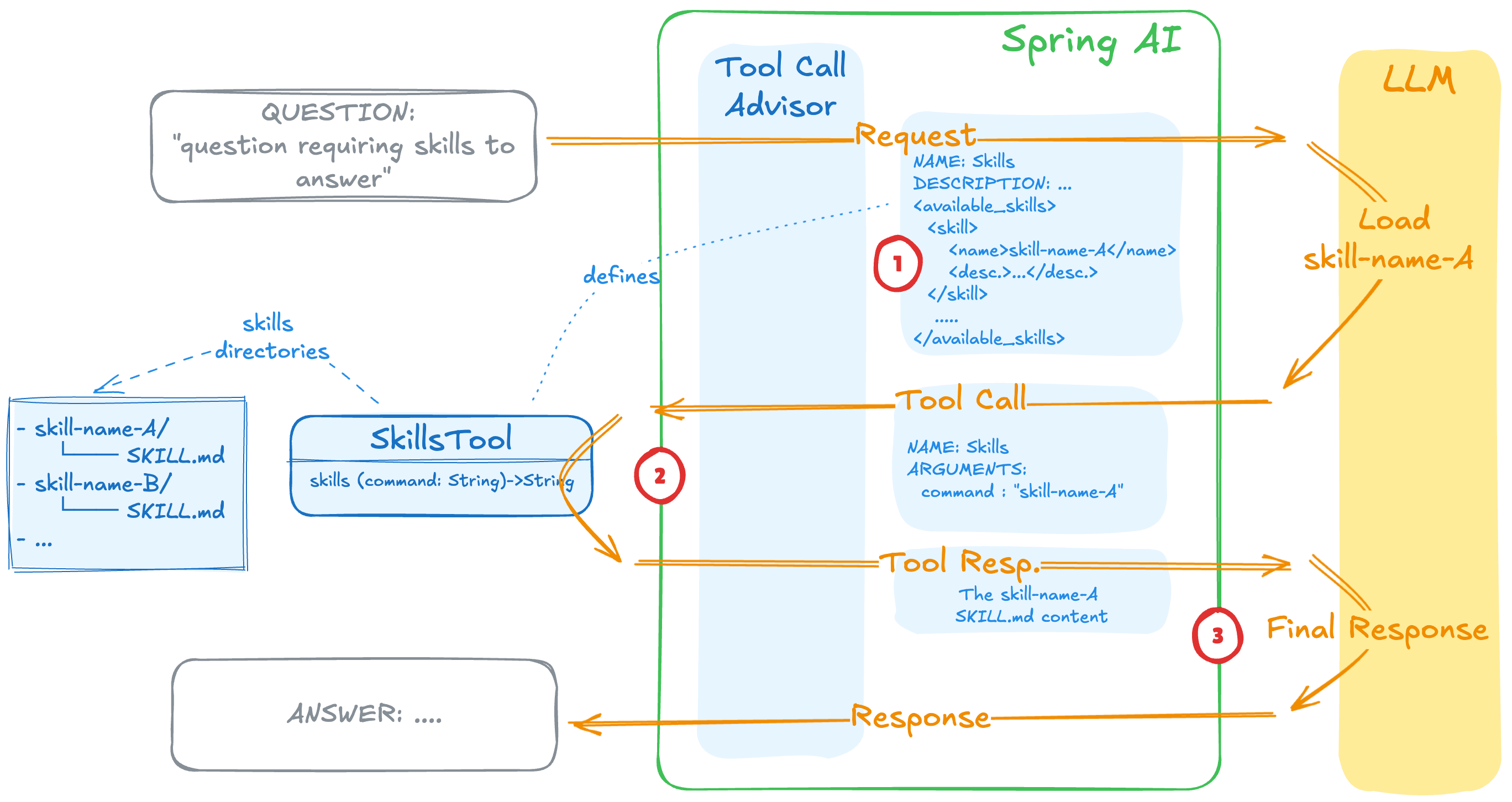 2. Semantic Matching (during conversation) - When a user makes a request, the LLM examines the skill descriptions embedded in the tool definition. If the LLM determines a user request semantically matches a skill’s description, it invokes the
 Skill tool with the skill name as a parameter.
3. Execution (on skill invocation) - When the Skill tool is called, SkillsTool loads the full SKILL.md content from disk and returns it to the LLM along with the skill’s base directory path. The LLM then follows the instructions in the skill content. If the skill references additional files or helper scripts, the LLM uses FileSystemTools’ Read function or ShellTools’ Bash function to access them on demand.
Skills in Action
This section demonstrates how skills work in practice with real-world examples.Example: Skills with References and Scripts
Step 3’s on-demand loading becomes powerful when skills bundle additional resources. Skills can include reference files with supplementary instructions and executable scripts for data processing—all loaded only when needed. Here’s an example from the my-skill skill that includes a YouTube transcript extraction helper and supplementaryresearch_methodology.md instructions:
Skill Directory Structure:
- Invokes the my-skill skill and loads its SKILL.md content
- Recognizes the need for research methodology and uses
Readto loadresearch_methodology.md - Recognizes the YouTube URL and uses
Bashto execute the helper script via ShellTools - Uses the video transcript to explain the concepts following the research methodology instructions
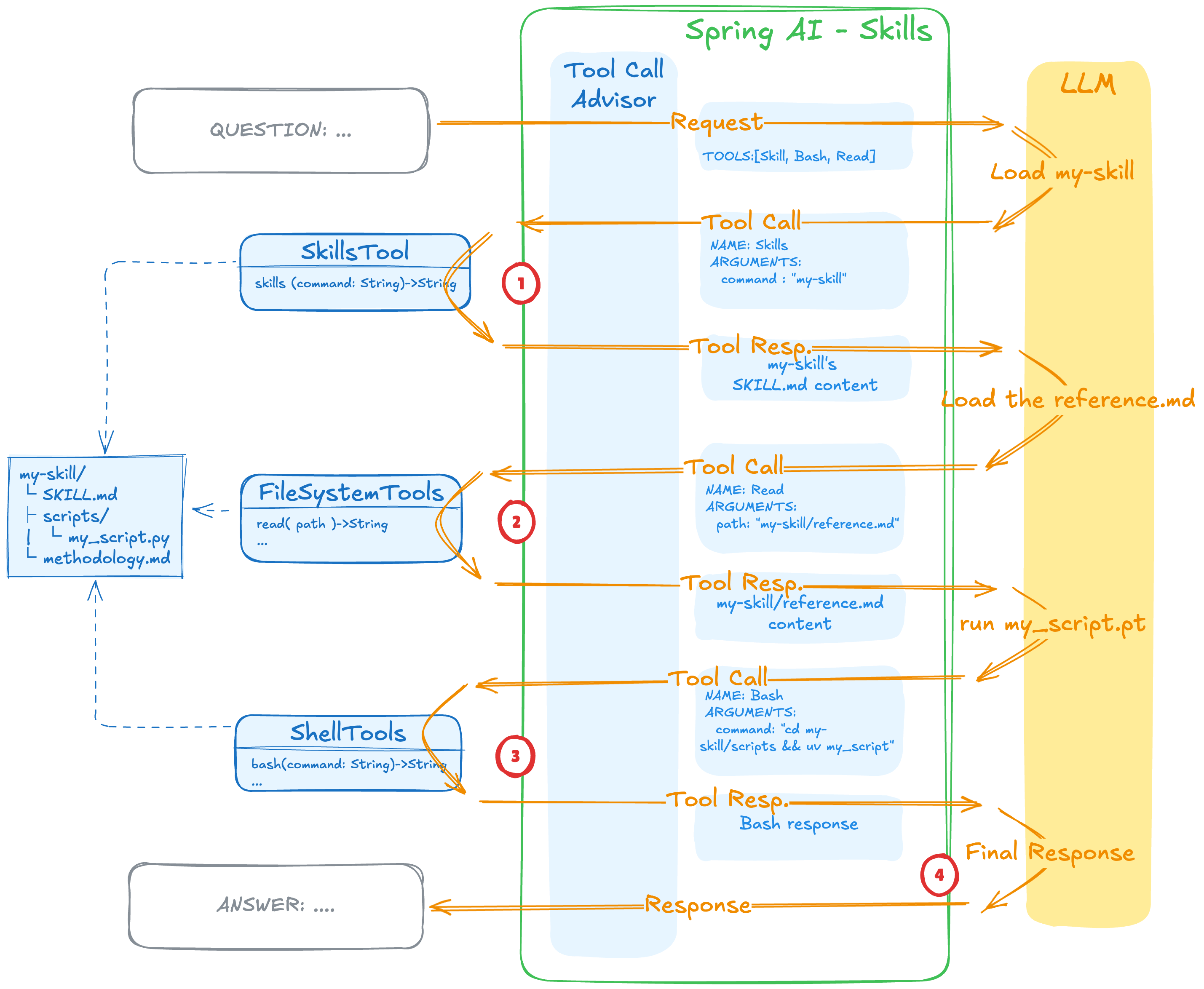 The script code never enters the context window—only the output does, making this approach highly token-efficient.
💡Demo Check out the Skills-Demo that implements this workflow.
The script code never enters the context window—only the output does, making this approach highly token-efficient.
💡Demo Check out the Skills-Demo that implements this workflow.
⚠️ Security Note: Scripts execute directly on your local machine without sandboxing. You’ll need to pre-install any required runtimes (Python, Node.js, etc.). For safer operation, consider running your agentic application in a container.
Getting Started
Ready to add Agent Skills to your Spring AI project? 1. Add the dependency:Note: For the latest stable release, check the GitHub releases page.
Note: You need Spring-AI version2. Configure your agent:2.0.0-SNAPSHOTor2.0.0-M2when released.
💡 Production Tip: For packaged applications, you can load skills from the classpath using Spring Resources:3. Create your first skill:This is particularly useful when distributing skills as part of your JAR/WAR deployment.
- Match “Review this controller” with the code-reviewer skill’s description
- Invoke the
Skilltool to load the full instructions fromSKILL.md - Use
Readtool (from FileSystemTools) to access the UserController.java file - Follow the review instructions and provide detailed feedback
Current Limitations
While the Spring AI Agent Skills implementation is powerful and flexible, there are some current limitations to be aware of: Script Execution Security - Scripts executed via ShellTools run directly on your local machine without sandboxing. This means potentially unsafe code could access your filesystem, network, or system resources. Always review skill scripts before use, especially from third-party sources. Consider running your agentic application in a containerized environment (Docker, Kubernetes) to limit exposure. No Human-in-the-Loop - Currently, there’s no built-in mechanism to require human approval before executing skills or scripts. The LLM can invoke any registered skill and execute any bundled script automatically. For production environments handling sensitive operations, you may need to implement custom approval workflows using Spring AI’s tool callback mechanisms, for example, aToolCallback wrapper.
Limited Skill Versioning - There’s currently no built-in versioning system for skills. If you update a skill’s behavior, all applications using that skill will immediately use the new version. For production deployments, consider implementing your own versioning strategy through directory structure (e.g., .claude/skills/v1/, .claude/skills/v2/).
Conclusion
Agent Skills bring modular, reusable capabilities to Spring AI applications without vendor lock-in. By providing domain knowledge on demand, you can update agent behavior without code changes, share skills across projects, and switch between LLM providers seamlessly. The spring-ai-agent-utils implementation makes this pattern accessible to Java developers with a simple, tool-based approach. Whether building coding assistants, documentation generators, or domain-specific agents, skills provide a scalable foundation for organizing agent knowledge. This is just the beginning. The other posts in this series dive deeper into advanced agentic patterns: Series links:- AskUserQuestionTool - Interactive workflows where agents gather user preferences during execution
- TodoWriteTool - Transparent, trackable agent workflows with multi-step task management
- Subagent Orchestration - Hierarchical multi-agent architectures with dedicated context windows
- Subagent Extension Framework (coming soon) - Protocol-agnostic agent orchestration (A2A, MCP, custom)
Resources
Spring AI Agent Utils Toolkit
- GitHub Repository: spring-ai-agent-utils
- Full Documentation: README.md
- Tool Documentation - Tools covered in this post: SkillsTool, FileSystemTools, ShellTools
- Spring AI Documentation: docs.spring.io/spring-ai
Example Projects
- skills-demo - Focused skills demonstration (this post)
- code-agent-demo - Full toolkit integration (Parts 2-3)
- subagent-demo - Hierarchical agents and A2A integration (Parts 4-5)
Agent Skills
- Specification: agentskills.io
- Claude Code Documentation: code.claude.com/docs
Related Spring AI Blogs
- Dynamic Tool Discovery - Achieve 34-64% token savings with on-demand tool loading
- Tool Argument Augmentation - Capture LLM reasoning and inner thoughts during tool execution