
 Model Context Protocol, or MCP for short, has taken over the AI world.
If you’ve been following our blog, you’ve probably read the introduction to the
topic, Connect Your AI to Everything: Spring AI’s MCP Boot Starters.
The security aspects of MCP have been evolving fast, and the latest version of the spec is getting more and more support
from the ecosystem.
To meet the needs of Spring users, we have incubated a dedicated project on
Github: spring-ai-community/mcp-security.
This week, we pushed our first releases, and you can now add them to your Spring AI 1.1.x-based applications.
In this post, we’ll explore:
Model Context Protocol, or MCP for short, has taken over the AI world.
If you’ve been following our blog, you’ve probably read the introduction to the
topic, Connect Your AI to Everything: Spring AI’s MCP Boot Starters.
The security aspects of MCP have been evolving fast, and the latest version of the spec is getting more and more support
from the ecosystem.
To meet the needs of Spring users, we have incubated a dedicated project on
Github: spring-ai-community/mcp-security.
This week, we pushed our first releases, and you can now add them to your Spring AI 1.1.x-based applications.
In this post, we’ll explore:
- Securing MCP Servers with OAuth2
- Building an MCP-compatible Spring Authorization Server
- Securing MCP Servers with API Keys instead of OAuth2
Securing MCP Servers with OAuth 2
According to the Authorization section of the MCP specification, MCP Servers exposed over HTTP must be secured with OAuth 2 access tokens. Any call to an MCP Server must have a headerAuthorization: Bearer <access_token>, where the access token is obtained
from an authorization server (think: Okta, Github, …) on behalf of the user.
The MCP Server must also explicitly advertise the authorization servers it trusts, so MCP clients can discover them
dynamically, register themselves with the auth servers, and obtain tokens.
We’ll discuss authorization servers later on, but for now we’ll assume you have an auth server configured and running at
<AUTH_SERVER_URL>, and we’ll hook our MCP Server to it.
If you need to setup an authorization server, see next section.
First, add the required dependencies to your project:
Maven:
application.properties, and inject your authorization server URL:
SecurityContext, and create a personalised
greeting.
The name of the user will be the sub claim from the JWT access token used to authenticate the request:
And, last but not least, we add a configuration class for security, for example McpServerSecurityConfiguration:
./mvnw spring-boot:run or ./gradlew bootRun. It should start on port 8080.
If you try to access the MCP server at http://localhost:8080/mcp, you will get an WWW-authenticate indicating the
OAuth2 resource metadata URL:
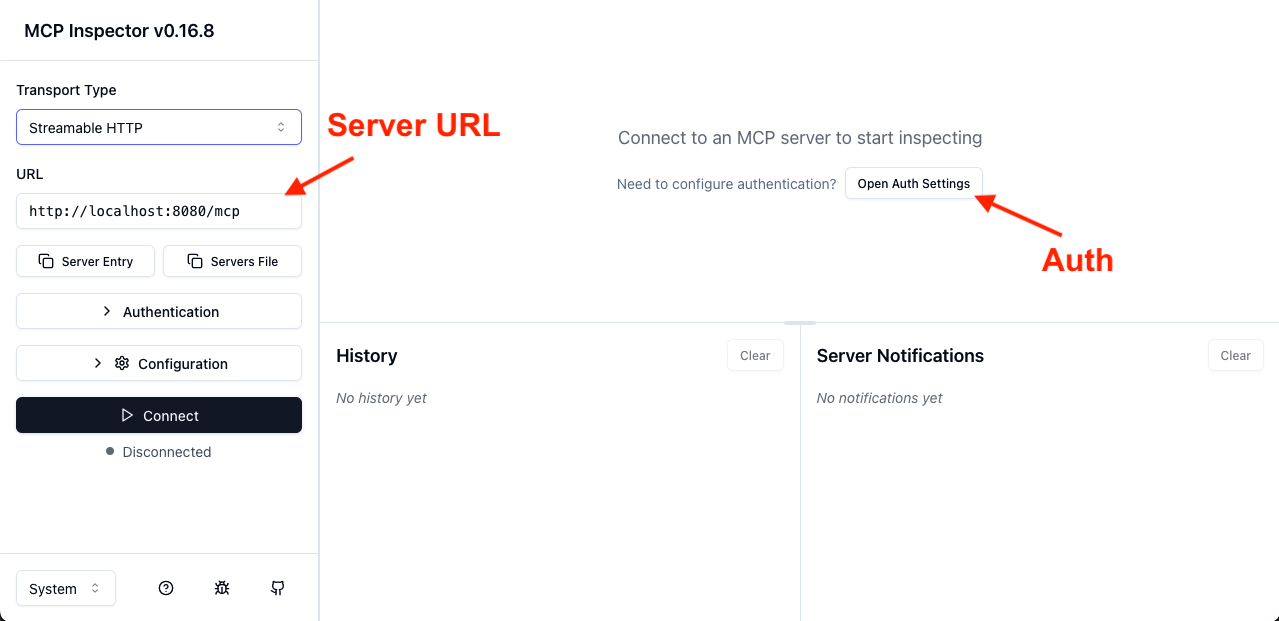 In the auth settings, select the “Quick OAuth Flow”.
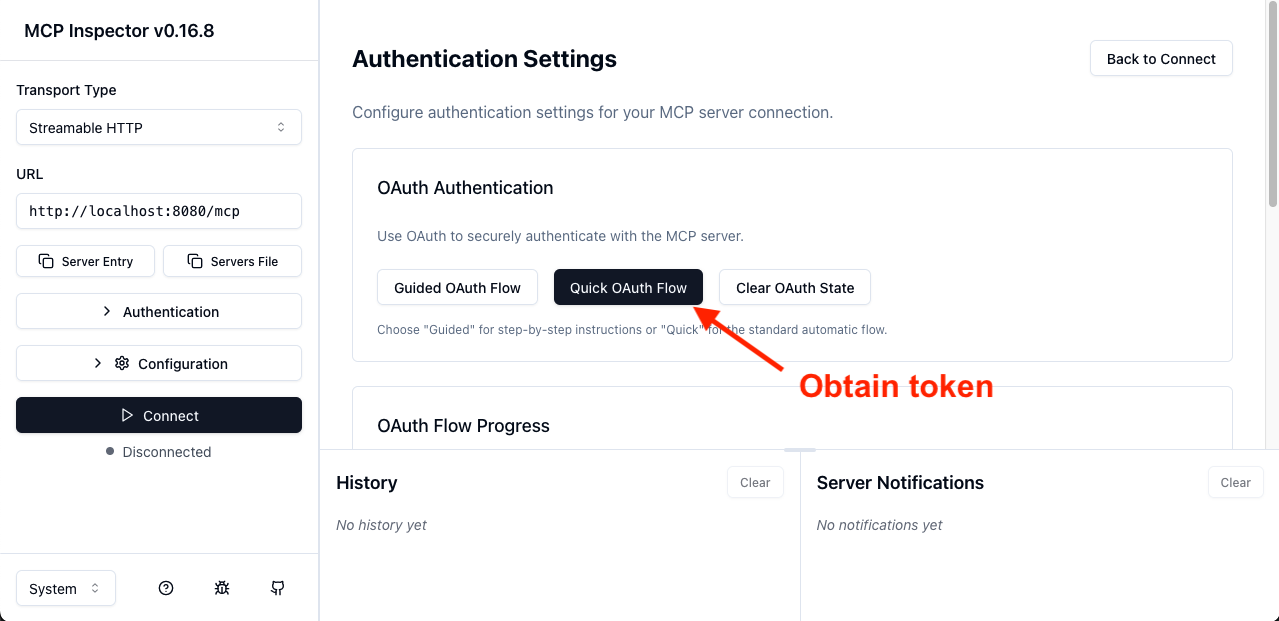 This will redirect you to the authorization server.
Once you log in, you will be redirected back to the MCP inspector, which will display a success message and the first
few characters of an access token. From there, you should be able to connect and ultimately call our “greeter” tool:
This will redirect you to the authorization server.
Once you log in, you will be redirected back to the MCP inspector, which will display a success message and the first
few characters of an access token. From there, you should be able to connect and ultimately call our “greeter” tool:
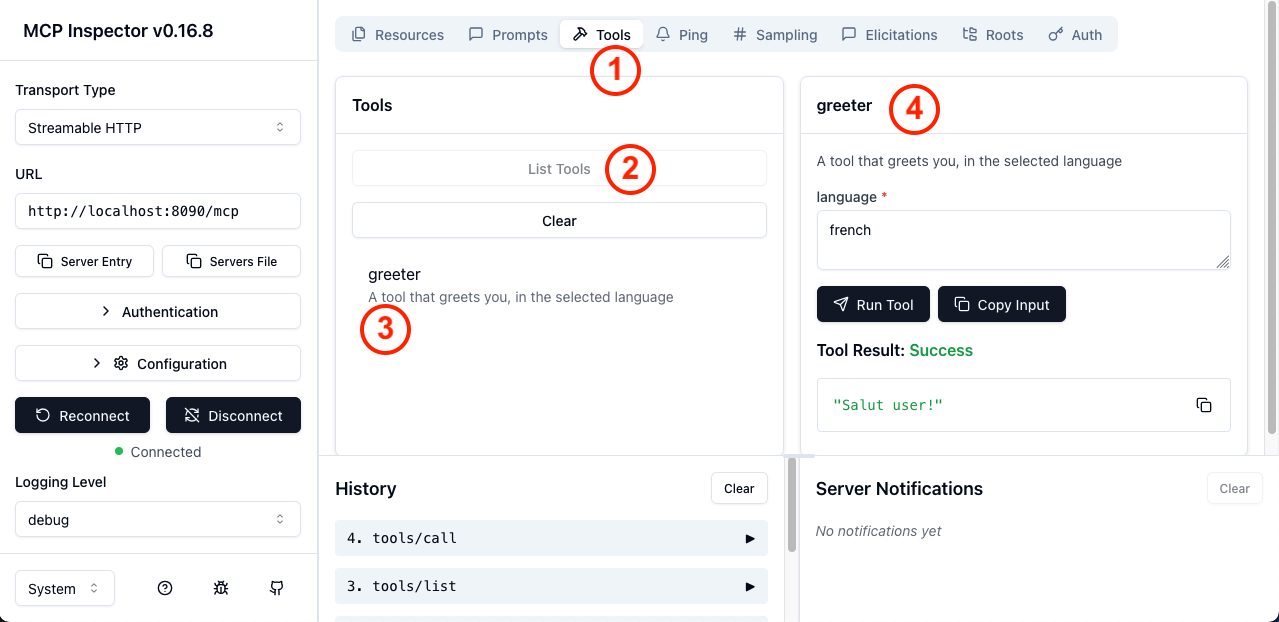 In the screenshot above, in order, you can do:
- Select the
Toolstab - Click
List tools - Select the
greetertool - Fill the arguments and call the tool
MCP-compatible Spring Authorization Server
To create an MCP-compatible authorization server with Spring, create a new Spring project, with Spring Authorization Server, and add the MCP-specific: Mavenapplication.yml for registering a default client and a default user:
user, password: password).
There will also be a single OAuth2 Client (default-client-id / default-client-secret).
You can then activate all the authorization server capabilities with the usual Spring Security API,
the security filter chain:
Beyond OAuth 2: API keys
While the MCP specification mandates using OAuth2 for security, many environments do not have the infrastructure to support this use-case. To be usable in environments lacking OAuth 2, many clients, including the MCP inspector itself, allow you to pass custom headers when making requests. This opens the door to alternative authentication flows, including API key-based security. The MCP Security project supports API keys, which we’ll showcase below. First, add the dependencies to your project:application.properties:
ApiKeyEntity. The MCP
server checks a specific header for an API key, loads the entity, and validates the secret.
You can bring your own entity implementation, and your own entity repository, for specific security validations.
With that, you can configure the security for your project in the usual Spring-Security way:
X-API-key: api01.mycustomapikey. X-API-key is the
default header name for passing API keys, followed by the header value {id}.{secret}.
The secret is stored in bcrypt-hashed form on the server side.
The mcpServerApiKey() configurer offers options for changing the header name, and even dedicated APIs to extract the
API key from incoming HTTP requests.
Improving MCP security
If you would like to learn more, head over to the spring-ai-community/mcp-security project, for documentation and samples. You will also find support for client-side MCP security with Spring AI and Spring Security. Try it out with your own projects and applications, test it with the rest of the ecosystem, and help us improve it! We are open to contributions, including feedback and issues. In another blog post, we’ll cover how to implement OAuth 2 on the client side, with theorg.springaiframework:mcp-client-security module.