
Your First Spring AI 1.0 Application
by Dr. Mark Pollack, Christian Tsolov, and Josh Long Hi, Spring fans! Spring AI is live on the Spring Initializr and everywhere fine bytes might be had. Ask your doctor if AI is right for you! It’s an amazing time to be a Java and Spring developer. There’s never been a better time to be a Java and Spring developer, and this is doubly true in this unique AI moment. You see, 90% of what people talk about when they talk about AI engineering is just integration with models, most of which have HTTP APIs. And most of what these models take is just human-languageStrings. This is integration code, and what place for these integrations to exist than hanging off the side of your Spring-based workloads? The same workloads who business logic drives your organizations and which guard data that feeds your organization.
the Pains and Patterns of AI Engineering
AI is amazing, but it’s not perfect. It has issues, as with all technologies! There are a few things to be on the watch for, and when you explore Spring AI, know that you’re doing so in terms of the patterns that support you on your journey to production. Let’s look at some of them.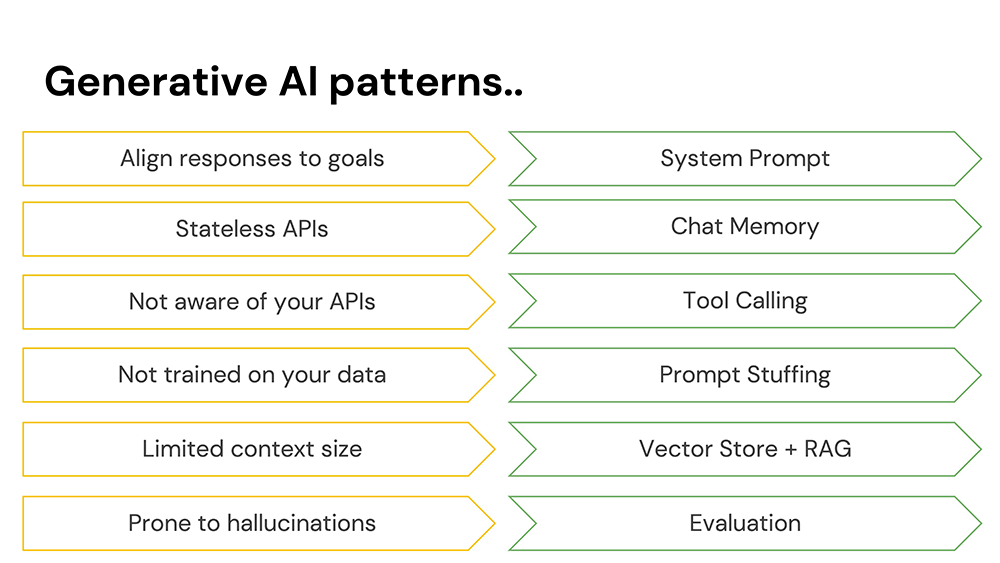 Chat models are amenable to just about anything, and will follow you down just about any rabbit hole. If you want it to stay focused on a particular mission, give it a system prompt.
Models are stateless. You might find that surprising if you’ve ever dealt with a model through ChatGPT or Claude Desktop, because they submit a transcript of everything that’s been said on each subsequent request. This transcript reminds the model what’s been said. The transcript is chat memory.
Models live in an isolated sandbox. This makes sense! We’ve all seen the documentary called The Terminator and know what can go wrong with unruly AI. But, they can do amazing things if you give them a bit of control, via tool calling.
Models are pretty darned smart, but they’re not omniscient! You can give them data in the body of the request to help better inform their responses. This is called prompt stuffing.
But don’t send too much data! Instead, send only that which might be germaine to the query at hand. You can do this by chucking the data into a vector store, to support finding records that are similar to one another. Then, do retrieval augmented generation (RAG), whereby you send the subselection of results from the vector store to the model for final analysis.
Chat models love to chat, even if they’re wrong. This can sometimes produce interesting and incorrect results called hallucinations. Use evaluators to validate that the response is basically what you intended it to be.
Chat models are amenable to just about anything, and will follow you down just about any rabbit hole. If you want it to stay focused on a particular mission, give it a system prompt.
Models are stateless. You might find that surprising if you’ve ever dealt with a model through ChatGPT or Claude Desktop, because they submit a transcript of everything that’s been said on each subsequent request. This transcript reminds the model what’s been said. The transcript is chat memory.
Models live in an isolated sandbox. This makes sense! We’ve all seen the documentary called The Terminator and know what can go wrong with unruly AI. But, they can do amazing things if you give them a bit of control, via tool calling.
Models are pretty darned smart, but they’re not omniscient! You can give them data in the body of the request to help better inform their responses. This is called prompt stuffing.
But don’t send too much data! Instead, send only that which might be germaine to the query at hand. You can do this by chucking the data into a vector store, to support finding records that are similar to one another. Then, do retrieval augmented generation (RAG), whereby you send the subselection of results from the vector store to the model for final analysis.
Chat models love to chat, even if they’re wrong. This can sometimes produce interesting and incorrect results called hallucinations. Use evaluators to validate that the response is basically what you intended it to be.
One Small Step for Spring Developers, One Giant Leap for AI
Spring AI is a huge leap forward, but for Spring developers it’ll feel like a natural next step. It works like any Spring project. It has portable service abstractions allowing you to work consistently and conveniently with any of a number of models. It provides Spring Boot starters, configuration properties, and autoconfiguration. And, Spring AI carries Spring Boot’s production-minded ethic forward, supporting vritual threads, GraalVM native images, and observability through Micrometer. It also offers a great developer experience, integrating Spring Boot’s DevTools, and provides rich support for Docker Compose and Testcontainers. As with all Spring projects, you can get started on the Spring Initializr.Meet the Dogs
And that’s just what we’re going to do! We’re going to build an application to support adopting dogs! I’m inspired by a dog that went viral back in 2021. The dog, named Prancer, sounds like he’d be quite the handful! Here’s my favorite excerpt from the ad: “Ok, I’ve tried. I’ve tried for the last several months to post this dog for adoption and make him sound…palatable. The problem is, he’s just not. There’s not a very big market for neurotic, man-hating, animal-hating, children-hating dogs that look like gremlins. But I have to believe there’s someone out there for Prancer, because I am tired and so is my family. Every day we live in the grips of the demonic Chihuahua hellscape he has created in our home.”The Pre-requisites
Sounds like quite a handful! But even spicy dogs deserve loving homes. So let’s build a service to unite people with the dogs of their dreams (or nightmares?) Hit the Spring Initializr and add the following dependencies to your project:PgVector, GraalVM Native Support, Actuator, Data JDBC, JDBC Chat Memory, PostgresML, Devtools, and Web. Choose Java 24 (or later) and Apache Maven as the build tool. (Strictly speaking, there’s no reason you could not use Gradle here, but the example will be in terms of Apache Maven) Make sure the artifact is named adoptions.
Make sure that in your pom.xml, you’ve also got: org.springframework.ai:spring-ai-advisors-vector-store.
Some of these things are familiar. Data JDBC just brings in Spring Data JDBC, which is just an ORM mapper that allows you to talk to a SQL database. Web brings in Spring MVC. Actuator brings in Spring Boot’s observability stack, underpinned in part by Micrometer. Devtools is a development-time concern, allowing you to do live-reloads as you make changes. It’ll automatically reload the code each time you do a “Save” operation in Visual Studio Code or Eclipse, and it’ll automatically kick in each time you alt-tab away from IntelliJ IDEA. GraalVM Native Support brings in support for the OpenJDK fork, GraalVM, which provides, among other things, an ahead-of-time compiler (AOT) that produces lightweight, lighting fast binaries.
We said that Spring Data JDBC will make it easy to connect to a SQL database, but which one? In our application, we’ll be using PostgreSQL, but not just vanilla PostgresSQL! We’re going to load two very important extensions: vector and postgresml. The vector plugin allows PostgresSQL to act as a vector store. You’ll need to turn arbitrary (text, image, audio) data into embeddings before they can be persisted. For this, you’ll need an embedding model. PostgresML provides that capability here. These concerns are usually orthaganol—it’s just very convenient that PostgreSQL can do both chores. A big part of building a Spring AI application is deciding upon which vector store, embedding model, and chat model you will use.
Claude is, of course, the chat model we’re going to be using today. To connect to it, you’ll need an API key. You can secure one from the Anthropic developer portal. Claude is an awesome fit for most enterprise workloads. It is often more polite, stable, and conservative in uncertain or sensitive contexts. This makes it a great choice for enterprise applications. Claude’s also great at document comprehension and at following multistep instructions.
The Database
As I said before, we’re going to use PostgreSQL. It’s not too difficult to get a Docker image working that supports bothvector and postgresml. I’ve included a file, adoptions/db/run.sh. Run that. It’ll launch a Docker image. You’ll then need to initialize it with an application user. Run adoptions/db/init.sh.
Now you’re all set.
Specify your everything to do with your database connectivity in application.properties:
PostgresML extension. We’re specifying what dimensions we want for vectors stored in PostgreSQL, and whether we want Spring AI to initialize the schema required to use it as a vector store.
We also want to install some data (the dogs!) into the database, so we’ll tell Spring Boot to run schema.sql and data.sql which creates a table and installs data in the database, respectively.
We’ll need to talk to the just-created dog table, so we’ve got a Spring Data JDBC entity and repository. Add the following types to the bottom of AdoptionsApplication.java, after the last }.
The Assistant
We’re going to field questions from users via our HTTP controller. Here’s the skeleton definition::8080/youruser/assistant. Try it out.
Chat Memory
Let’s put that friendship to the test.PromptChatMemoryAdvisor. Add its definition to the AdoptionsApplication.
spring.ai.chat.memory.repository.jdbc.initialize-schema=always).
Change the configuration for the ChatClient:
PromptChatMemoryAdvisor to do its work, it needs to some way to correlate the request from you with a given conversation. You can do this by assigning a conversation ID on the request. Modify the inquire method:
Principal#getName() call, instead. If you have Spring Security installed, you could inject the authenticated principal as a parameter of the controller method.
Relaunch the program and then re-run the same HTTP interactions, and this time you should find the model remembers you. NB: you can always reset the memory by deleting the data in that particular table.
System Prompts
Nice! If you just built a quick UI, you’d have—in effect—your own Claude Desktop. Which is not exactly what we want. Remember, we’re trying to help people adopt dog from our fictitious dog adoption agency Pooch Palace. We don’t want people doing their homework or getting coding help from our assistant. Let’s give out model a mission statement by configuring a system priompt. Change the configuration again:Avoid Token Bankruptcy with Good Observability
We haven’t extended access to our SQL database to the model (yet). We could read all the database in and then just concatenate it all into the body of the request. Conceptually, assuming we have a small enough data set and a large enough token count, that would work. But it’s the principle of the thing! Remember, all interactions with the model incur a token cost. This cost may be born in dollars and cents, such as when using hosted multitenant LLMs like Claude, or at the very least its born in complexity (CPU and GPU resource consumption) costs. Either way: we want to reduce those costs, whenever possible. You can and should keep an eye on the token consumption thanks to the Spring AI integration with the Actuator module. In yourapplication.properties, add the following:
localhost:8080/actuator/metrics in your browser and you should see metrics starting with gen_ai, e.g.: gen_ai.client.token.usage. Get the details about that metric here: localhost:8080/actuator/metrics/gen_ai.client.token.usage. The metrics integration is powered by the fabulous Micrometer project, which integrates with darn near every time series database under the sun, including Prometheus, Graphite, Netflix Atlas, DataDog, Dynatrace, etc. So, you could also have these metrics published to those TSDBs to help build out that all important single pane of glass experience for operations.
Retrieval Augmented Generation (R.A.G.) with Vector Stores
Read all the data from the SQL database using the newly mintedDogRepository and then write out Spring AI Documents to the VectorStore in the constructor.
Document with some string data. It doesn’t matter what’s in the string.
This will use PostgresML behind the scenes to do the work. We must configure a QuestionAnswerAdvisor so that the ChatClient will know to consult the vector store for supporting documents (“doguments”?) the requests before sending the request off to the model for final analysis. Modify the definition of the ChatClient later on in the constructor accordingly:
Structured Output
NB: We’ve been getting the response as a String, but that’s no foundation on which to build an abstraction! We need a strongly typed object we can pass around our codebase. You could have the model map the return data to such a strongly-typed object, if you wanted. Suppose you had the following record:entity(Class<?>) method instead of the content() method:
content(), since after all we’re building a chatbot.
Local Tool Calling
So, we’ve been reunited with the dog of our dreams! What now? Well, the natural next step for any red-blood human being would be to want to adopt that doggo, surely! But there’s scheduling to be done. Let’s allow the model to integrate with our patent-pending, class-leading scheduling algorithm by giving it access to tools. Add the following type to the bottom of the code page:@Tools. Importantly, the tools have descriptions in human language prose that are as descriptive as possible. Remember when your mother said, “use your words!” This is what she meant! It’ll help you be a better AI engineer (not to mention a better teammate, but that discussion is a totally different Oprah for another day…).
Make sure to update the ChatClient configuration by pointing it to the tools:
Model Context Protocol
Already, we’ve opened up a ton of possibilities! Spring AI is a concise and powerful component model, and Claude is a very brilliant chat model, with which we’ve integrated our data and our tools. Ideally, though, we should be able to consume tools in a uniform fashion, without being coupled so much to a particular programming model. In November 2025, Anthropic released an update to Claude Desktop that featured a new network protocol called Model Context Protocol (MCP). MCP provides a convenient way for the model to benefit from tools regardless of the language in which they were written. There are two flavors of MCP: STDIO and HTTP streaming over server-sent events (SSE). The result has been very positive! Since its launch we’ve witnessed a Cambrian explosion of new MCP services - . There are countless MCP sercices. There are countless directories of MCP services. And now, we’re starting to see a proliferation of directories of directories of new MCP services! And it all redounds to our benefit; each MCP service is a new trick you can teach your model. There are MCP services for Spring Batch, Spring Cloud Config Server, Cloud Foundry, Heroku, AWS, Google Cloud, Azure, Microsoft Office, Github, Adobe, etc. There are MCP services that let you render 3D scenes in Blender3D. There are MCP services which in turn connect any number of other integrations and services, including those in Zapier, for example. And now, we’re going to add one more to the mix. Let’s extract out the scheduling algorithm as an MCP service and reuse it thusly. Hit the Spring Initializr and selectGraalVM Native Support, Web and Model Context Protocol Server. Choose Java 24 (or later) and Apache Maven. Name the project scheduler. Hit Generate and then open the project inside the resulting .zip file in your favorite IDE.
Cut and paste the DogAdoptionScheduler to the bottom of the new project. Add the following definition to the main class (SchedulerApplication.java):
application.properties to ensure the new service starts on a different port.
adoptions module and let’s rework it to point instead to this new, remote HTTP-based MCP service.
Delete all references in the code to the DogAdoptionScheduler . Define a bean of type McpSyncClient in the configuration.
.json configuration file since the beginning and to ease interoperability, Spring AI also supports this configuration format. Here’s the .json configuration for the GitHub MCP service, for example:
application.properties file, for example:
The Chatbox Is the New UX
MCP debuted in Claude Desktop, and at the time of its launch it only supported STDIO-based services on the same host. Recently, that’s changed. Claude Desktop just added support for HTTP remote MCP services, such as ourscheduler. You’ll need to upgrade your Anthropic Account as, at least at the time of this writing, it’s only available behind a Max plan. (for which I could not wait to pay!) You can repurpose our scheduler service as a tool that you wield directly from Claude Desktop itself. Assuming you have Claude Desktop installed (it works on macOS and Windows as of this writing), you’d go through the following steps to configure the remote integration.
First, you’ll need top open up Claude’s Settings screen.
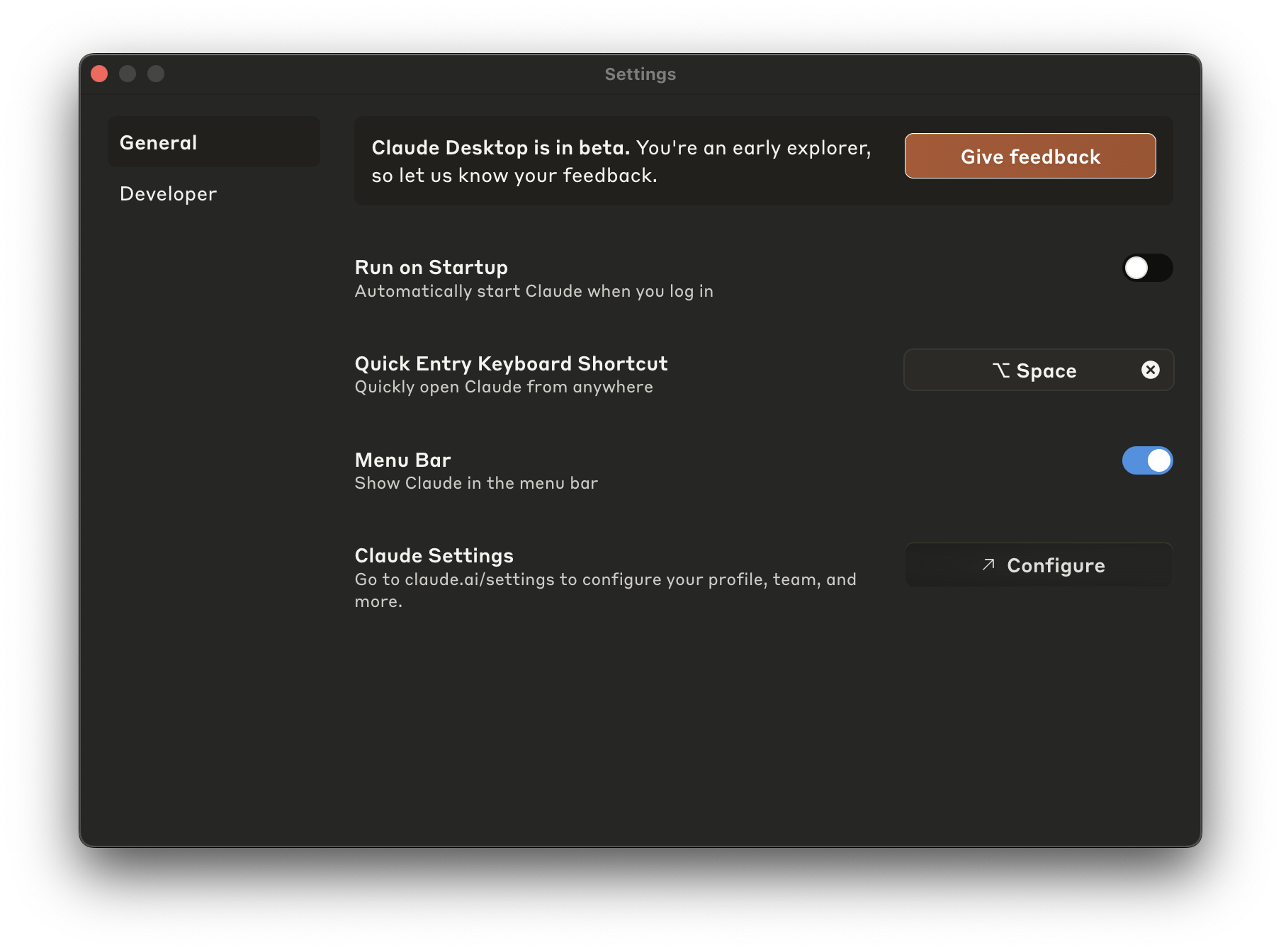 Then, open up the
 Integrations section of the Settings screen.
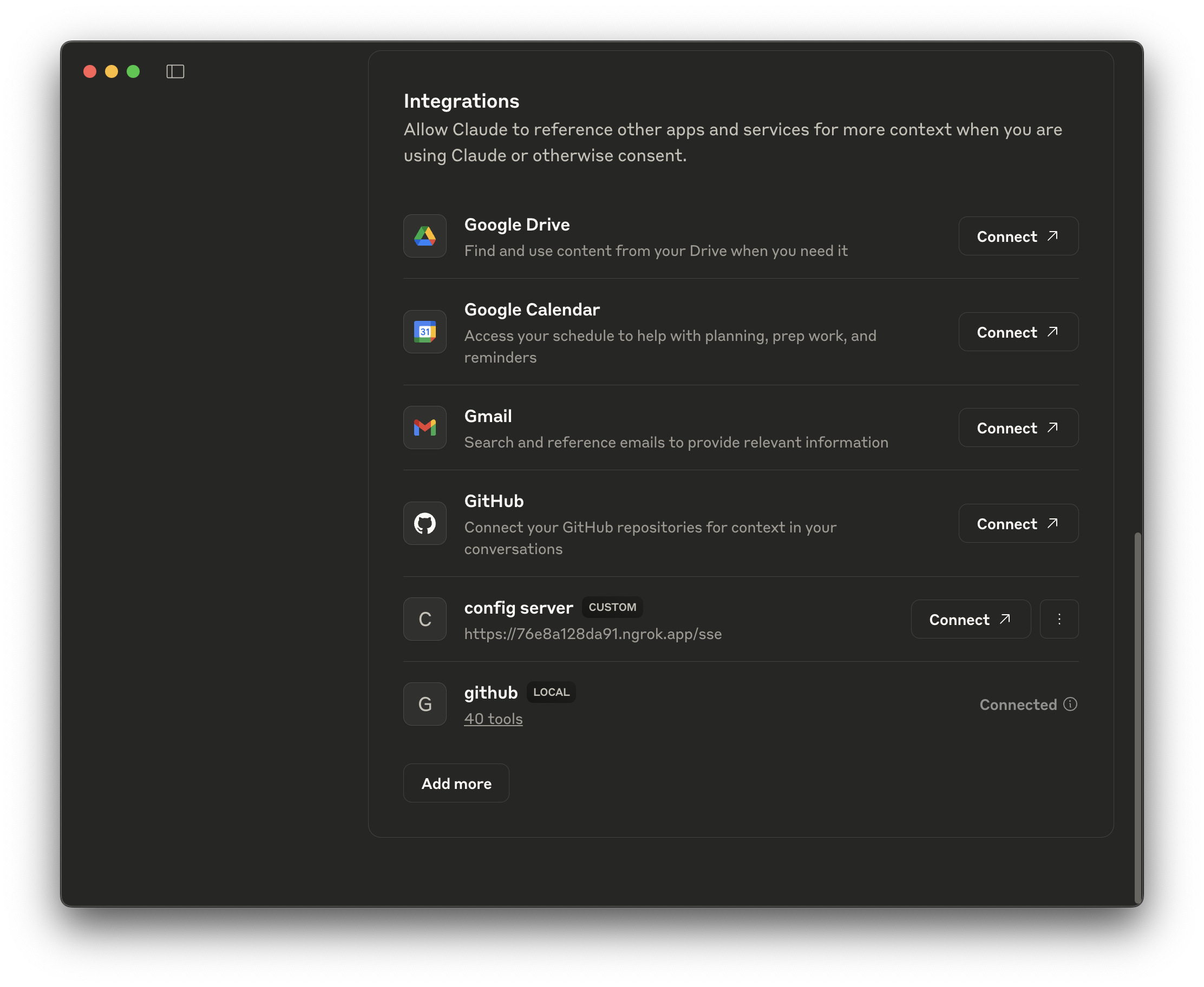 In order for you to test this service, it’ll need to have a publicly available URL. Obviously, there are a ton of places you could run your application (CloudFoundry, AWS, Google Cloud, Azure, etc.), but to make development a little easier, may we recommend
 ngrok? It’ll make your local service(s) available on a dynamic public URL. We had to pay to upgrade to get it to stop showing an interstitial page. It was maybe $8 USD, if memory serves, which isn’t too bad. Run:
8081, allowing you to access it via a dynamic URL printed to the console.
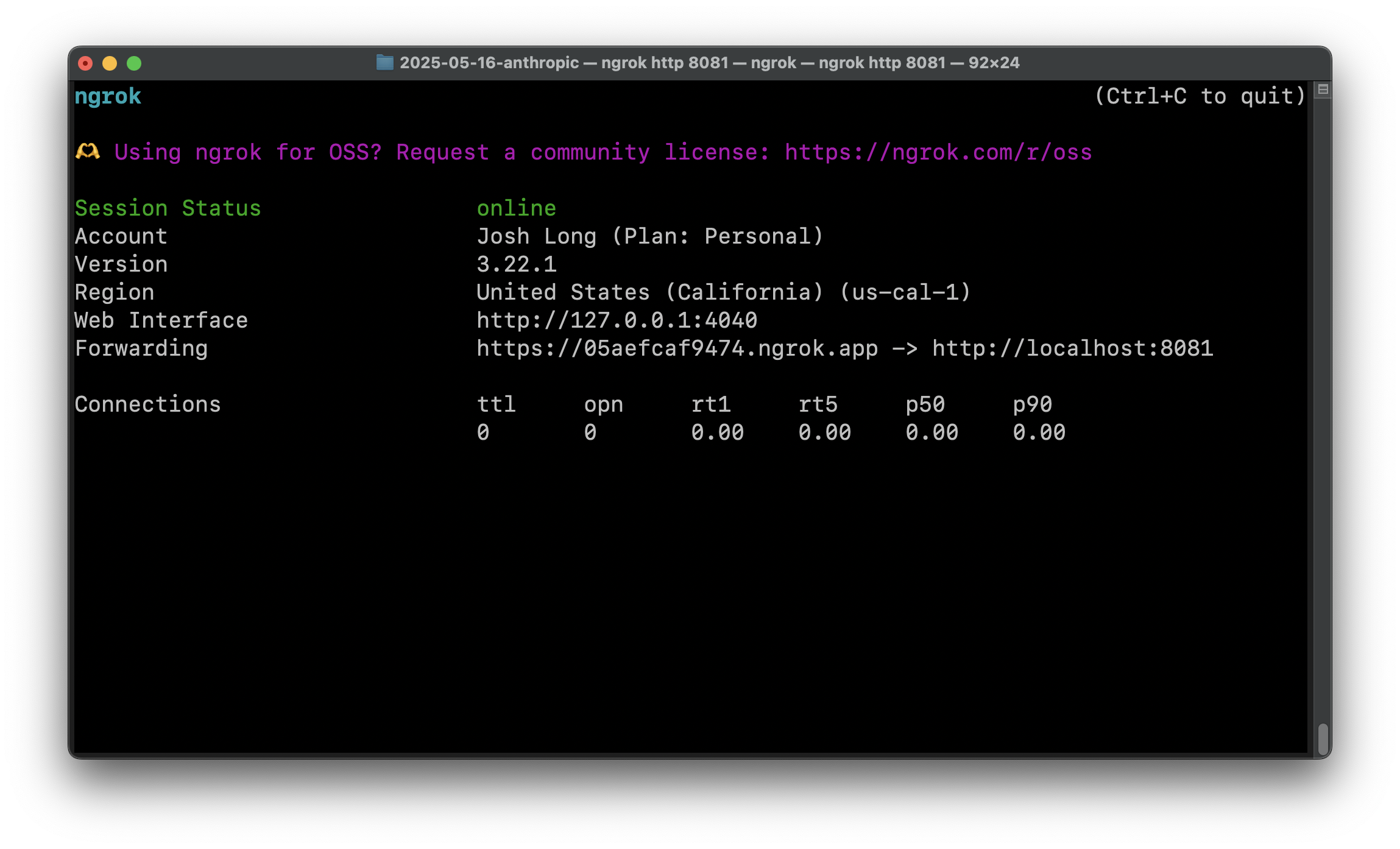 Now we need to tell Claude Desktop about the service back in the
 Integrations section of the Settings page.
 Hit
Hit Add and then Connect on the main screen. You should see confirmation of the connection between Claude Desktop and the scheduler service on port 8081 in the ngrok console.
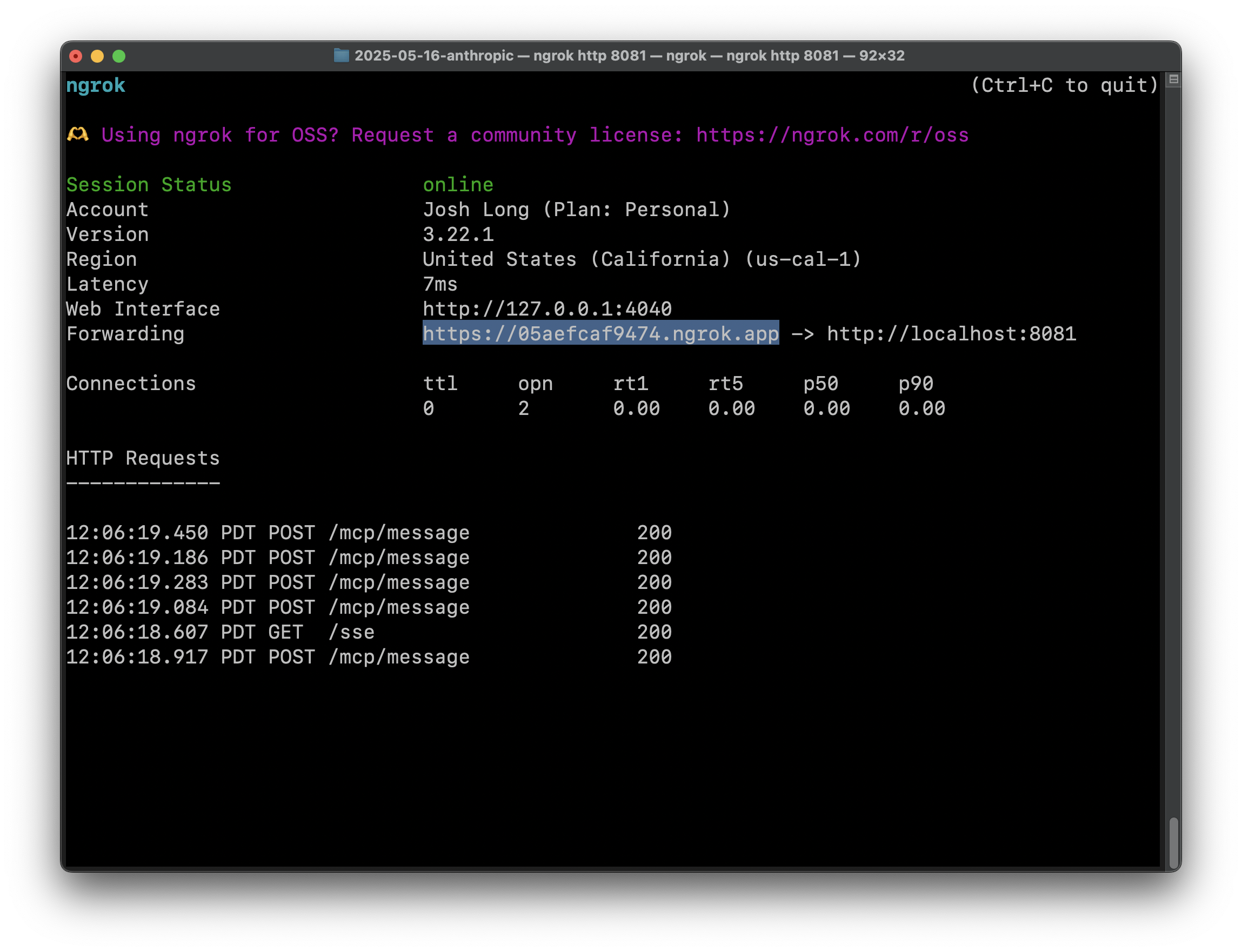 Ask Claude Desktop the same question as above: “when can i schedule an appointment to pickup Prancer from the New York City location?” In our run, it also asked us to specify the ID of the dog, which we did:
 45. It’ll eventually prompt you to permit it to invoke the tool you just gave it:
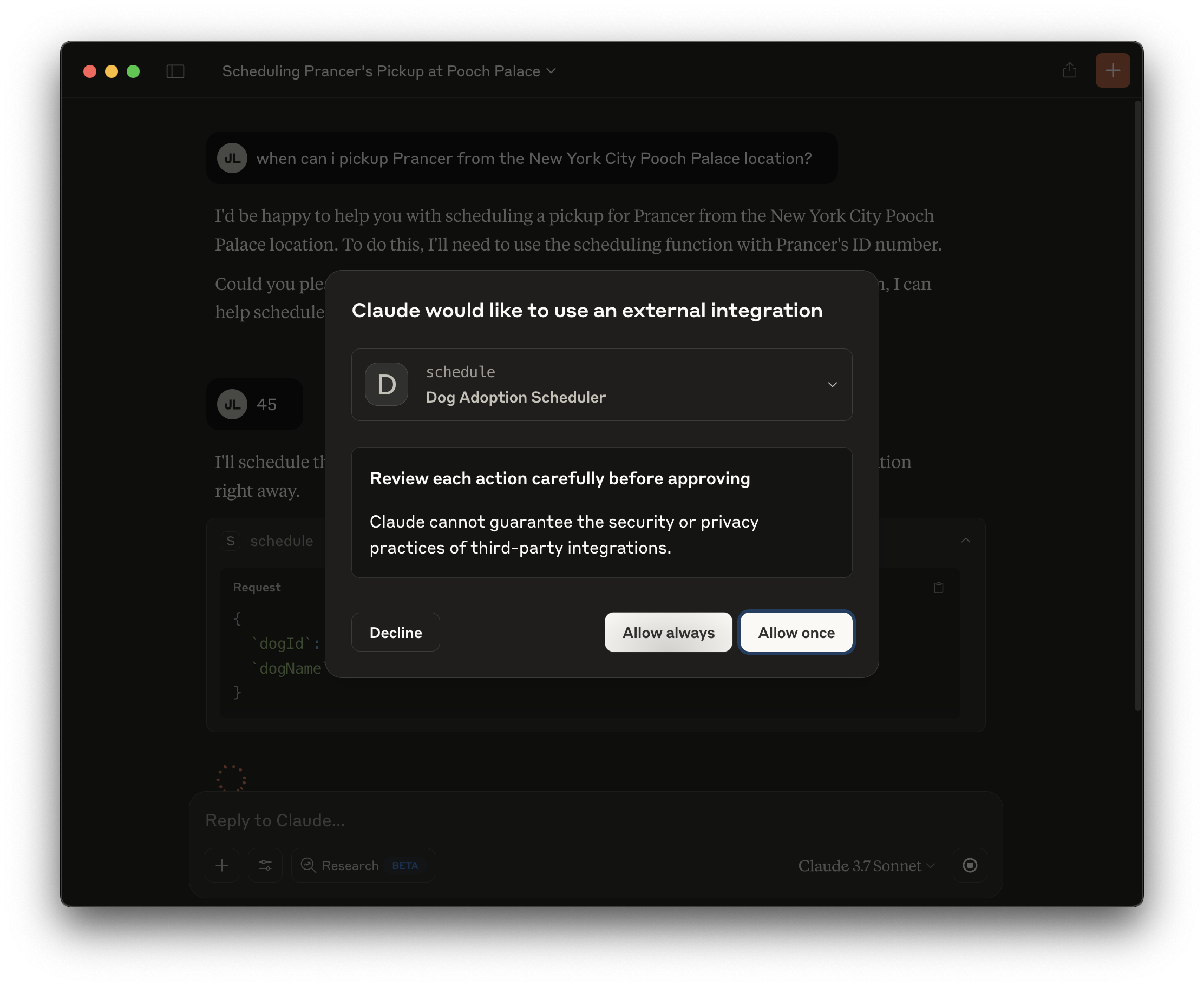 Oblige it and then off it goes!
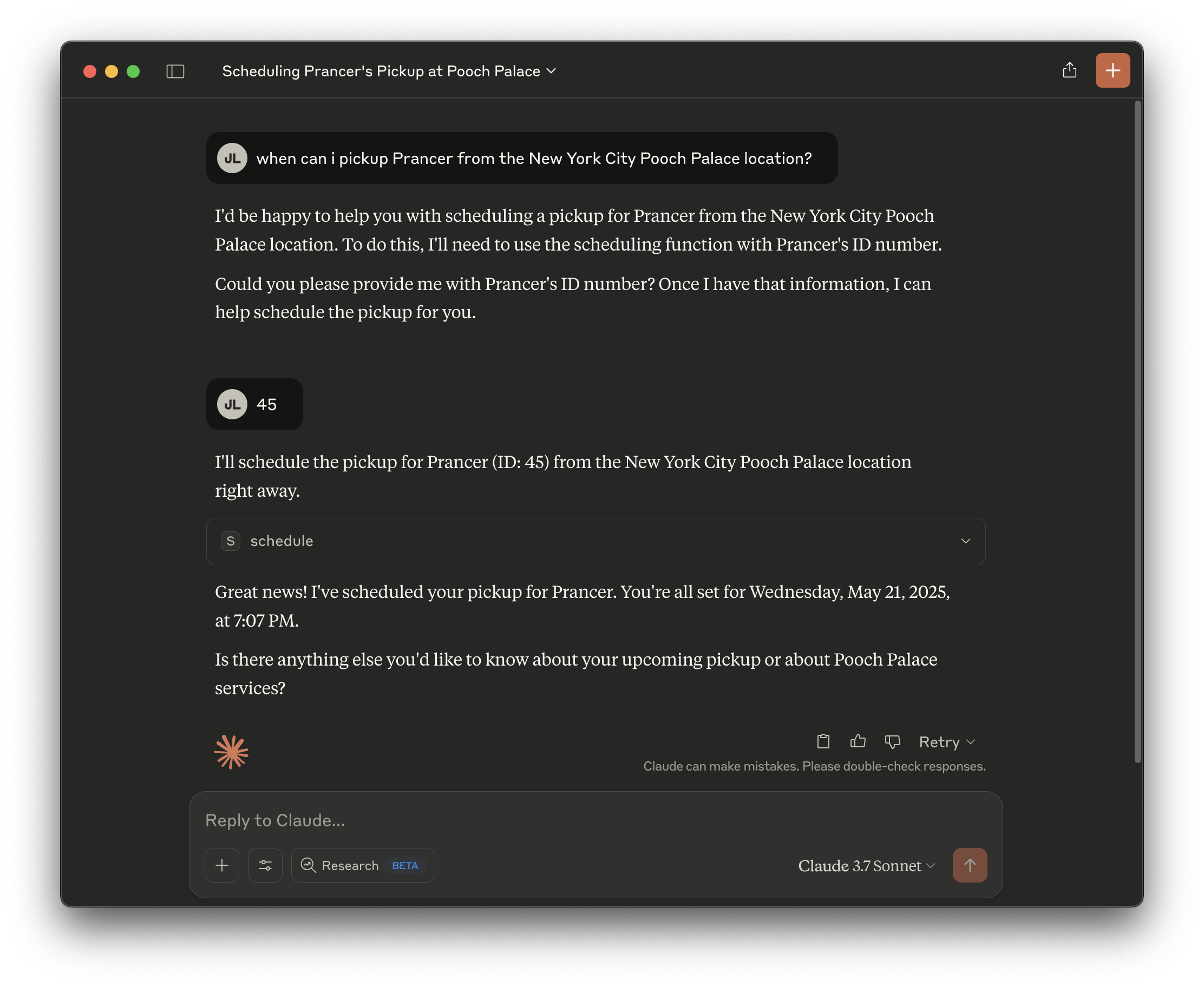 It should give you a date three days hence. Neat!
Production Worthy AI
Now, it’s time to turn our eyes toward production.Security
It’s trivial to use Spring Security to lock down this web application. You could use the authenticatedPrincipal#getName to use as the conversation ID too. What about the data stored in the database, like the conversations? Well, you have a few options here. Many databases support encryption at rest as a passive capability.
Scalability
We want this code to be scalable. Remember, each time you make an HTTP request to a model (or many relational databases), you’re doing blocking IO. IO that sits on a thread and makes that thread unavailable to any other demand in the system until the IO has completed. This is a waste of a perfectly good thread! Threads aren’t meant to just sit idle, waiting. Java 21 gives us virtual threads, which - for sufficiently IO bound services - can dramatically improve scalability. That’s why you should (almost?) always set upspring.threads.virtual.enabled=true in the application.properties file.
GraalVM Native Images
GraalVM is an AOT compiler, led by Oracle, that you can consume through the GraalVM Community Edition open source project or through the very powerful (and free) Oracle GraalVM distribution. If you’re using SDKMAN, it’s trivial to install either:sdk install java 24-graalce or sdk install java 24-graal. Then, make sure to use one of those JDK distributions, e.g.: sdk use java 24-graal or even make it your default system-wide sdk default java 24-graalce.
Remember, we configured both of our Spring AI services with GraalVM Native Support, which adds a build plugin which will allow us to create turn this application into an operating system and architecture-specific native binary: