> ## Documentation Index
> Fetch the complete documentation index at: https://springaicommunity.mintlify.site/llms.txt
> Use this file to discover all available pages before exploring further.
# Spring AI Playground
> Self-hosted web UI for AI experimentation, RAG workflows, and MCP integrations
 [GitHub](https://github.com/spring-ai-community/spring-ai-playground)
## Overview
**Spring AI Playground** is a self-hosted web UI that simplifies AI experimentation and testing. It provides Java developers with an intuitive interface for working with **large language models (LLMs)**, **vector databases**, **prompt engineering**, and **Model Context Protocol (MCP)** integrations.
Built on **Spring AI**, it supports leading model providers and includes comprehensive tools for testing **retrieval-augmented generation (RAG)** workflows and MCP integrations. The goal is to make AI more accessible to developers, helping them quickly prototype **Spring AI-based applications** with enhanced contextual awareness and external tool capabilities.
**Version**: Latest from GitHub
No API keys required when using Ollama - easy to get started!
## Key Features
Unified chat interface with dynamic RAG and MCP integration
Full RAG flows: upload, chunk, embed, search with score details
Register, test, and invoke MCP tools interactively
Progressive Web App for desktop and mobile
Ollama, OpenAI, and OpenAI-compatible servers
Modern, responsive UI built with Vaadin Flow
## Playgrounds
### Chat Playground
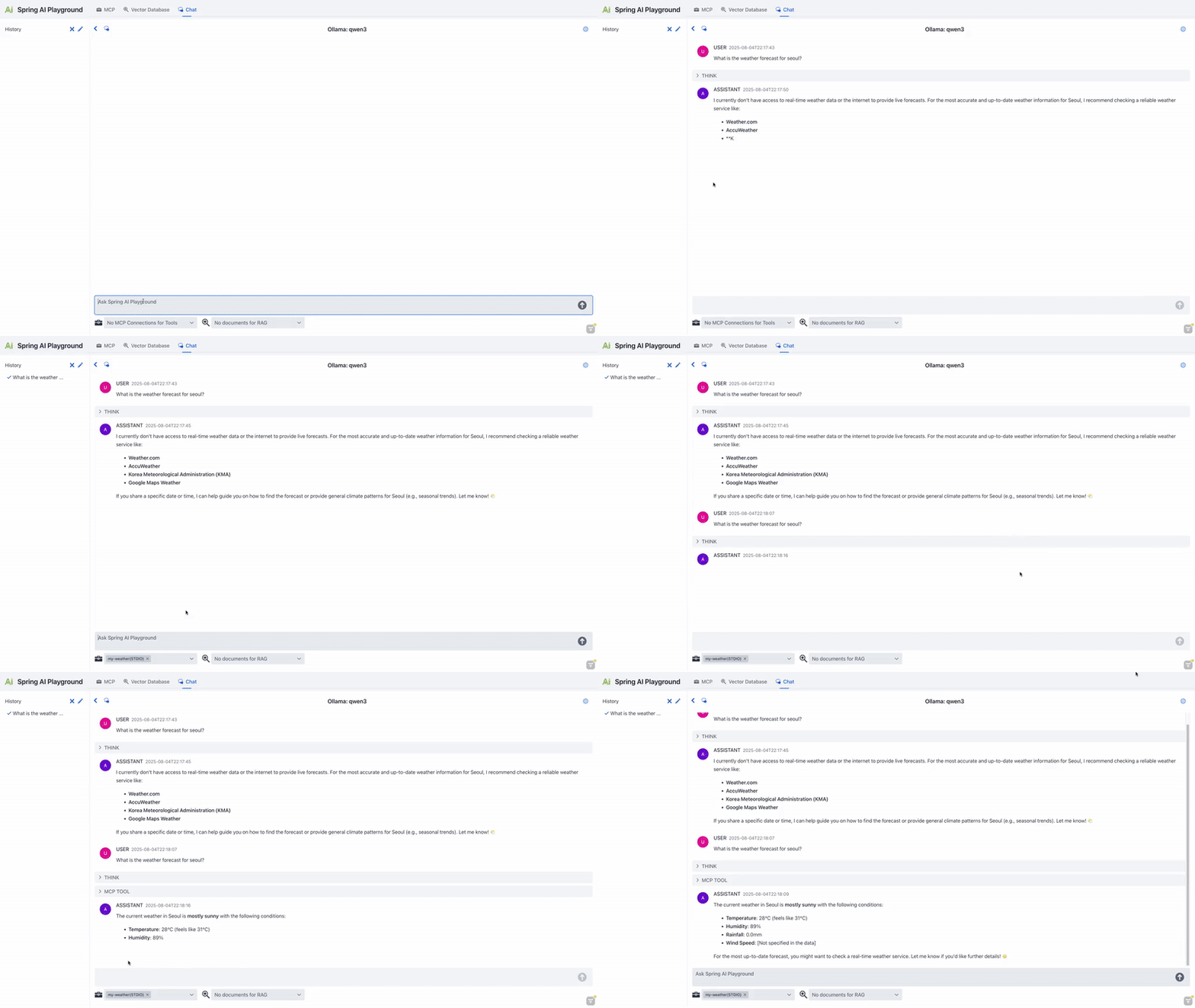
A unified chat interface powered by Spring AI's ChatClient that dynamically uses configurations from VectorDB and MCP playgrounds, enabling conversations enriched with retrieval and external tools.
[GitHub](https://github.com/spring-ai-community/spring-ai-playground)
## Overview
**Spring AI Playground** is a self-hosted web UI that simplifies AI experimentation and testing. It provides Java developers with an intuitive interface for working with **large language models (LLMs)**, **vector databases**, **prompt engineering**, and **Model Context Protocol (MCP)** integrations.
Built on **Spring AI**, it supports leading model providers and includes comprehensive tools for testing **retrieval-augmented generation (RAG)** workflows and MCP integrations. The goal is to make AI more accessible to developers, helping them quickly prototype **Spring AI-based applications** with enhanced contextual awareness and external tool capabilities.
**Version**: Latest from GitHub
No API keys required when using Ollama - easy to get started!
## Key Features
Unified chat interface with dynamic RAG and MCP integration
Full RAG flows: upload, chunk, embed, search with score details
Register, test, and invoke MCP tools interactively
Progressive Web App for desktop and mobile
Ollama, OpenAI, and OpenAI-compatible servers
Modern, responsive UI built with Vaadin Flow
## Playgrounds
### Chat Playground
A unified chat interface powered by Spring AI's ChatClient that dynamically uses configurations from VectorDB and MCP playgrounds, enabling conversations enriched with retrieval and external tools.
 ### VectorDB Playground
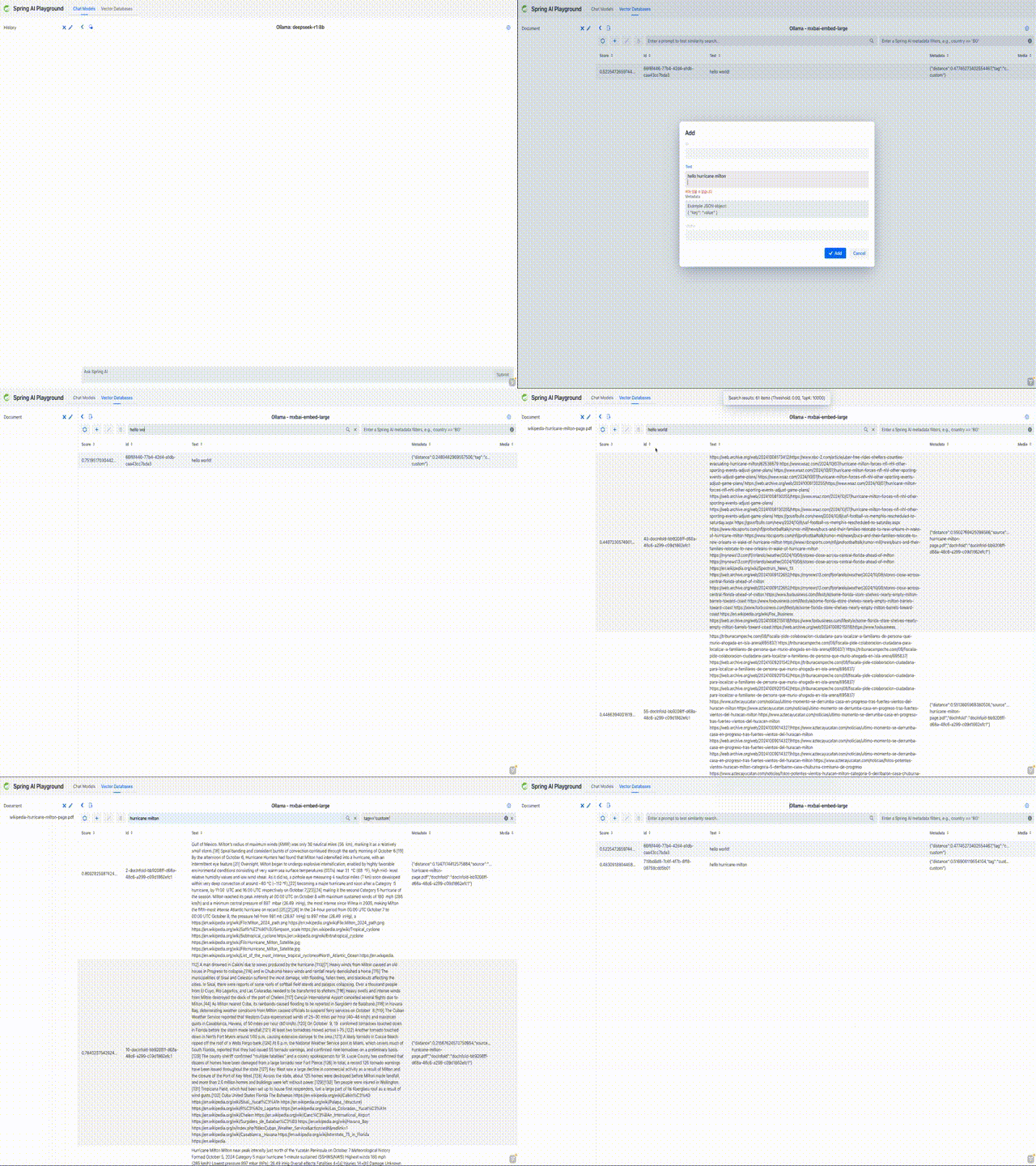 Supports full RAG flows with Spring AI's `RetrievalAugmentationAdvisor`:
* **Custom Chunk Input**: Directly input and chunk custom text for embedding
* **Document Uploads**: Upload PDFs, Word documents, and PowerPoint presentations
* **Search and Scoring**: Vector similarity searches with similarity scores (0-1)
* **Filter Expressions**: Metadata-based filtering (e.g., `author == 'John' && year >= 2023`)
### MCP Playground
Supports full RAG flows with Spring AI's `RetrievalAugmentationAdvisor`:
* **Custom Chunk Input**: Directly input and chunk custom text for embedding
* **Document Uploads**: Upload PDFs, Word documents, and PowerPoint presentations
* **Search and Scoring**: Vector similarity searches with similarity scores (0-1)
* **Filter Expressions**: Metadata-based filtering (e.g., `author == 'John' && year >= 2023`)
### MCP Playground
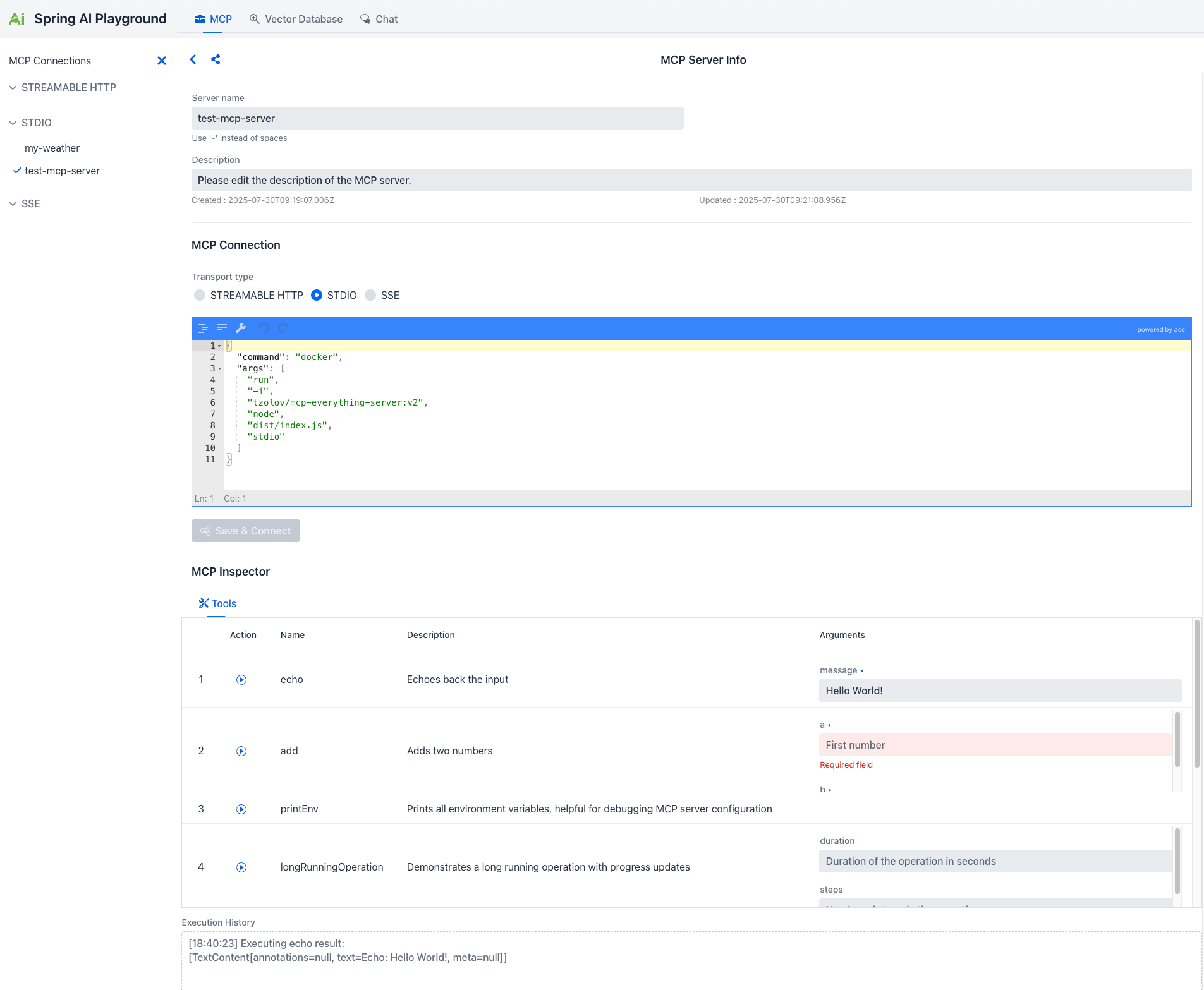 Comprehensive Model Context Protocol integration:
* **Connection Management**: Configure MCP connections with STREAMABLE HTTP, STDIO, and SSE transports
* **MCP Inspector**: Explore available tools with detailed information on arguments and parameters
* **Interactive Testing**: Execute MCP tools directly with real-time results and execution history
**STREAMABLE HTTP** (MCP v2025-03-26) is a single-endpoint HTTP transport replacing HTTP+SSE. Clients send JSON-RPC via POST to /mcp with optional SSE-style streaming.
## Supported Technologies
* **Ollama** - Local LLM with tool-enabled models
* **OpenAI** - GPT-3.5, GPT-4, and more
* **OpenAI-compatible servers** - llama.cpp, TabbyAPI, LM Studio
* **All Spring AI supported providers** - Anthropic, Google, Amazon, Microsoft
All Spring AI VectorStore implementations including:
* PostgreSQL/PGVector, ChromaDB, Milvus, Qdrant, Redis
* Pinecone, Weaviate, Elasticsearch, MongoDB Atlas
* Neo4j, OpenSearch, Oracle, Azure Cosmos DB
* **STREAMABLE HTTP** - New single-endpoint transport (MCP v2025-03-26)
* **STDIO** - Direct process communication (requires local running)
* **SSE** - Server-Sent Events transport
## Quick Start
### Prerequisites
* Java 21 or later
* Ollama running on your machine
* Docker (optional, but recommended)
### Running with Docker (Recommended)
```bash theme={null}
# Clone the repository
git clone https://github.com/spring-ai-community/spring-ai-playground.git
cd spring-ai-playground
# Build Docker image
./mvnw spring-boot:build-image -Pproduction -DskipTests=true \
-Dspring-boot.build-image.imageName=jmlab/spring-ai-playground:latest
# Run container
docker run -d -p 8282:8282 --name spring-ai-playground \
-e SPRING_AI_OLLAMA_BASE_URL=http://host.docker.internal:11434 \
-v spring-ai-playground:/home \
--restart unless-stopped \
jmlab/spring-ai-playground:latest
```
Access the application at [http://localhost:8282](http://localhost:8282)
**MCP STDIO Transport**: Docker is not suitable for testing MCP STDIO transport as it requires direct process-to-process communication. Use local running instead.
**Linux Users**: `host.docker.internal` may not be available. Use `--network="host"` or replace with your host machine's IP (e.g., `172.17.0.1`).
### Running Locally
```bash theme={null}
./mvnw clean install -Pproduction -DskipTests=true
./mvnw spring-boot:run
```
### PWA Installation
Spring AI Playground supports Progressive Web App installation for a native app-like experience:
1. Open the application at `http://localhost:8282`
2. Look for the browser's PWA install prompt or the "Install PWA" button
3. Follow the installation wizard
## Chat Using RAG
1. **Set Up Vector Database**: Upload documents through the VectorDB Playground
2. **Select Documents**: Choose documents to use as the knowledge base
3. **Chat**: The system retrieves relevant content and generates knowledge-grounded responses
## Chat Using MCP
1. **Configure MCP Servers**: Set up connections in the MCP Playground
2. **Select Connections**: Choose MCP connections in the Chat page
3. **Chat**: The AI automatically uses available MCP tools based on context
When using Ollama, ensure you're using a **tool-enabled model** that supports function calling. Check [Ollama's Tools category](https://ollama.com/search?c=tools) for compatible models.
## Upcoming Features
Build production-ready agents combining MCP, RAG, and Chat in unified workflows
Tools to track and monitor AI performance, usage, and errors
Login and security features to control access
Embedding, image, audio, and moderation models
## Resources
View source code and contribute
Spring AI reference documentation
## License
Spring AI Playground is Open Source software released under the [Apache 2.0 license](https://github.com/spring-ai-community/spring-ai-playground/blob/main/LICENSE).
Comprehensive Model Context Protocol integration:
* **Connection Management**: Configure MCP connections with STREAMABLE HTTP, STDIO, and SSE transports
* **MCP Inspector**: Explore available tools with detailed information on arguments and parameters
* **Interactive Testing**: Execute MCP tools directly with real-time results and execution history
**STREAMABLE HTTP** (MCP v2025-03-26) is a single-endpoint HTTP transport replacing HTTP+SSE. Clients send JSON-RPC via POST to /mcp with optional SSE-style streaming.
## Supported Technologies
* **Ollama** - Local LLM with tool-enabled models
* **OpenAI** - GPT-3.5, GPT-4, and more
* **OpenAI-compatible servers** - llama.cpp, TabbyAPI, LM Studio
* **All Spring AI supported providers** - Anthropic, Google, Amazon, Microsoft
All Spring AI VectorStore implementations including:
* PostgreSQL/PGVector, ChromaDB, Milvus, Qdrant, Redis
* Pinecone, Weaviate, Elasticsearch, MongoDB Atlas
* Neo4j, OpenSearch, Oracle, Azure Cosmos DB
* **STREAMABLE HTTP** - New single-endpoint transport (MCP v2025-03-26)
* **STDIO** - Direct process communication (requires local running)
* **SSE** - Server-Sent Events transport
## Quick Start
### Prerequisites
* Java 21 or later
* Ollama running on your machine
* Docker (optional, but recommended)
### Running with Docker (Recommended)
```bash theme={null}
# Clone the repository
git clone https://github.com/spring-ai-community/spring-ai-playground.git
cd spring-ai-playground
# Build Docker image
./mvnw spring-boot:build-image -Pproduction -DskipTests=true \
-Dspring-boot.build-image.imageName=jmlab/spring-ai-playground:latest
# Run container
docker run -d -p 8282:8282 --name spring-ai-playground \
-e SPRING_AI_OLLAMA_BASE_URL=http://host.docker.internal:11434 \
-v spring-ai-playground:/home \
--restart unless-stopped \
jmlab/spring-ai-playground:latest
```
Access the application at [http://localhost:8282](http://localhost:8282)
**MCP STDIO Transport**: Docker is not suitable for testing MCP STDIO transport as it requires direct process-to-process communication. Use local running instead.
**Linux Users**: `host.docker.internal` may not be available. Use `--network="host"` or replace with your host machine's IP (e.g., `172.17.0.1`).
### Running Locally
```bash theme={null}
./mvnw clean install -Pproduction -DskipTests=true
./mvnw spring-boot:run
```
### PWA Installation
Spring AI Playground supports Progressive Web App installation for a native app-like experience:
1. Open the application at `http://localhost:8282`
2. Look for the browser's PWA install prompt or the "Install PWA" button
3. Follow the installation wizard
## Chat Using RAG
1. **Set Up Vector Database**: Upload documents through the VectorDB Playground
2. **Select Documents**: Choose documents to use as the knowledge base
3. **Chat**: The system retrieves relevant content and generates knowledge-grounded responses
## Chat Using MCP
1. **Configure MCP Servers**: Set up connections in the MCP Playground
2. **Select Connections**: Choose MCP connections in the Chat page
3. **Chat**: The AI automatically uses available MCP tools based on context
When using Ollama, ensure you're using a **tool-enabled model** that supports function calling. Check [Ollama's Tools category](https://ollama.com/search?c=tools) for compatible models.
## Upcoming Features
Build production-ready agents combining MCP, RAG, and Chat in unified workflows
Tools to track and monitor AI performance, usage, and errors
Login and security features to control access
Embedding, image, audio, and moderation models
## Resources
View source code and contribute
Spring AI reference documentation
## License
Spring AI Playground is Open Source software released under the [Apache 2.0 license](https://github.com/spring-ai-community/spring-ai-playground/blob/main/LICENSE).