#### JSON (default)
```json theme={null}
[{"PassengerId":"31","Survived":"0","Pclass":"1","Name":"Uruchurtu, Don. Manuel E","Sex":"male","Age":40,"SibSp":"0","Parch":"0","Ticket":"PC 17601","Fare":27.7208,"Cabin":null,"Embarked":"C"},
{"PassengerId":"32","Survived":"1","Pclass":"1","Name":"Spencer, Mrs. William Augustus (Marie Eugenie)","Sex":"female","Age":null,"SibSp":"1","Parch":"0","Ticket":"PC 17569","Fare":146.5208,"Cabin":"B78","Embarked":"C"},
{"PassengerId":"33","Survived":"1","Pclass":"3","Name":"Glynn, Miss. Mary Agatha","Sex":"female","Age":null,"SibSp":"0","Parch":"0","Ticket":"335677","Fare":7.75,"Cabin":null,"Embarked":"Q"},
{"PassengerId":"34","Survived":"0","Pclass":"2","Name":"Wheadon, Mr. Edward H","Sex":"male","Age":66,"SibSp":"0","Parch":"0","Ticket":"C.A. 24579","Fare":10.5,"Cabin":null,"Embarked":"S"},
{"PassengerId":"35","Survived":"0","Pclass":"1","Name":"Meyer, Mr. Edgar Joseph","Sex":"male","Age":28,"SibSp":"1","Parch":"0","Ticket":"PC 17604","Fare":82.1708,"Cabin":null,"Embarked":"C"}]
```
#### TOON
```toon theme={null}
[5]{PassengerId,Survived,Pclass,Name,Sex,Age,SibSp,Parch,Ticket,Fare,Cabin,Embarked}:
"31","0","1","Uruchurtu, Don. Manuel E",male,40,"0","0",PC 17601,27.7208,null,C
"32","1","1","Spencer, Mrs. William Augustus (Marie Eugenie)",female,null,"1","0",PC 17569,146.5208,B78,C
"33","1","3","Glynn, Miss. Mary Agatha",female,null,"0","0","335677",7.75,null,Q
"34","0","2","Wheadon, Mr. Edward H",male,66,"0","0",C.A. 24579,10.5,null,S
"35","0","1","Meyer, Mr. Edgar Joseph",male,28,"1","0",PC 17604,82.1708,null,C
```
#### XML
```xml theme={null}
3101Uruchurtu, Don. Manuel Emale4000PC 1760127.7208C
3211Spencer, Mrs. William Augustus (Marie Eugenie)female10PC 17569146.5208B78C
3313Glynn, Miss. Mary Agathafemale003356777.75Q
3402Wheadon, Mr. Edward Hmale6600C.A. 2457910.5S
3501Meyer, Mr. Edgar Josephmale2810PC 1760482.1708C
```
#### YAML
```yaml theme={null}
---
- PassengerId: "31"
Survived: "0"
Pclass: "1"
Name: "Uruchurtu, Don. Manuel E"
Sex: "male"
Age: 40
SibSp: "0"
Parch: "0"
Ticket: "PC 17601"
Fare: 27.7208
Cabin: null
Embarked: "C"
...
- PassengerId: "35"
Survived: "0"
Pclass: "1"
Name: "Meyer, Mr. Edgar Joseph"
Sex: "male"
Age: 28
SibSp: "1"
Parch: "0"
Ticket: "PC 17604"
Fare: 82.1708
Cabin: null
Embarked: "C"
```
#### CSV
```csv theme={null}
PassengerId,Survived,Pclass,Name,Sex,Age,SibSp,Parch,Ticket,Fare,Cabin,Embarked
31,0,1,"Uruchurtu, Don. Manuel E",male,40,0,0,"PC 17601",27.7208,,C
32,1,1,"Spencer, Mrs. William Augustus (Marie Eugenie)",female,,1,0,"PC 17569",146.5208,B78,C
33,1,3,"Glynn, Miss. Mary Agatha",female,,0,0,335677,7.75,,Q
34,0,2,"Wheadon, Mr. Edward H",male,66,0,0,"C.A. 24579",10.5,,S
35,0,1,"Meyer, Mr. Edgar Joseph",male,28,1,0,"PC 17604",82.1708,,C
```
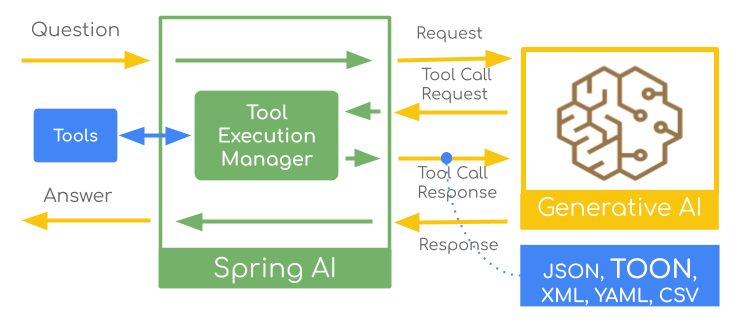 JSON is the go-to format for LLM tool responses, but recent discussions around alternative formats like [TOON](https://github.com/toon-format/toon) (Token-Oriented Object Notation) claim potential benefits in token efficiency and performance.
While the debate continues—with [critical analyses](https://www.improvingagents.com/blog/toon-benchmarks) pointing to [context-dependent results](https://www.towardsdeeplearning.com/toon-benchmarks-a-critical-analysis-of-different-results-d2a74563adca)—the question is: how to experiment with these formats in your own Spring AI applications?
This article demonstrates **how** to configure Spring AI to convert tool responses between `JSON`, `TOON`, `XML`, `CSV`, and `YAML`, enabling you to decide what works best for your specific use case.
## Spring AI Tool Calling: A Quick Overview
Let's briefly review how [Spring AI Tool Calling](https://docs.spring.io/spring-ai/reference/api/tools.html#_overview) works:
JSON is the go-to format for LLM tool responses, but recent discussions around alternative formats like [TOON](https://github.com/toon-format/toon) (Token-Oriented Object Notation) claim potential benefits in token efficiency and performance.
While the debate continues—with [critical analyses](https://www.improvingagents.com/blog/toon-benchmarks) pointing to [context-dependent results](https://www.towardsdeeplearning.com/toon-benchmarks-a-critical-analysis-of-different-results-d2a74563adca)—the question is: how to experiment with these formats in your own Spring AI applications?
This article demonstrates **how** to configure Spring AI to convert tool responses between `JSON`, `TOON`, `XML`, `CSV`, and `YAML`, enabling you to decide what works best for your specific use case.
## Spring AI Tool Calling: A Quick Overview
Let's briefly review how [Spring AI Tool Calling](https://docs.spring.io/spring-ai/reference/api/tools.html#_overview) works:
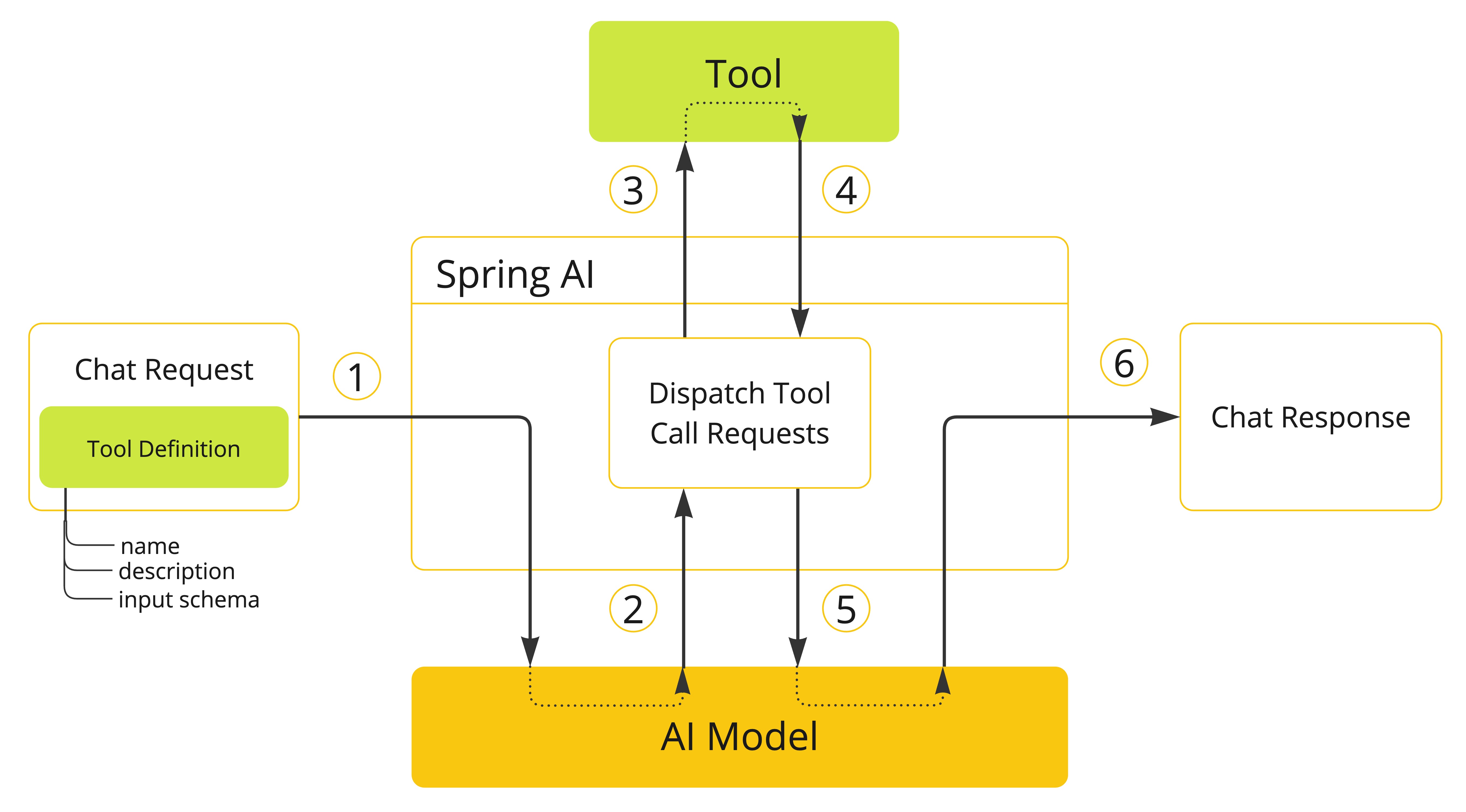 1. Tool definitions (name, description, parameters schema) are added to the chat request.
2. When the model decides to call a tool, it sends the tool name and input parameters.
3. Spring AI identifies and executes the tool with the provided parameters.
4. Spring AI handles the tool result.
5. Spring AI sends the tool result back to the model as part of the conversation history.
6. The model generates the final response using the tool result as additional context.
The [ToolCallback](https://github.com/spring-projects/spring-ai/blob/main/spring-ai-model/src/main/java/org/springframework/ai/tool/ToolCallback.java) interface is at the heart of this process. Each tool is wrapped in a `ToolCallback` that handles the serialization and execution logic.
We can intercept and convert the response format at two key points:
* **Tool Result level**: After the tool executes but before JSON serialization (Approach 1)
* **Response level**: After JSON serialization, transforming JSON to another format (Approach 2)
Both approaches have their merits, and the choice depends on your specific requirements. Let's explore each in detail.
## Approach 1: Custom ToolCallResultConverter Configuration
> **Important**: Applicable only for local tool implementations such as `@Tool`, `FunctionToolCallback` and `MethodToolCallback`. Currently it is not supported by the MCP Tools.
The [ToolCallResultConverter](https://docs.spring.io/spring-ai/reference/api/tools.html#_result_conversion) interface provides fine-grained control over individual tool formats.
The DefaultToolCallResultConverter serializes the result to JSON, but you can customize the serialization process by providing your own ToolCallResultConverter implementation.
For example, a custom ToonToolCallResultConverter can look like this:
```java theme={null}
public static class ToonToolCallResultConverter implements ToolCallResultConverter {
private ToolCallResultConverter delegate = new DefaultToolCallResultConverter();
@Override
public String convert(@Nullable Object result, @Nullable Type returnType) {
// First convert to JSON using the default converter
String json = this.delegate.convert(result, returnType);
// Then convert JSON to TOON
return JToon.encodeJson(json);
}
}
```
It uses the default JSON converter, then converts to TOON using libraries such as [JToon](https://github.com/toon-format/toon-java) or [toon4j](https://github.com/ricken07/toon4j).
**Register with @Tool:**
```java theme={null}
@Tool(description = "Get random titanic passengers",
resultConverter = ToonToolCallResultConverter.class) // (1)
public List
1. Tool definitions (name, description, parameters schema) are added to the chat request.
2. When the model decides to call a tool, it sends the tool name and input parameters.
3. Spring AI identifies and executes the tool with the provided parameters.
4. Spring AI handles the tool result.
5. Spring AI sends the tool result back to the model as part of the conversation history.
6. The model generates the final response using the tool result as additional context.
The [ToolCallback](https://github.com/spring-projects/spring-ai/blob/main/spring-ai-model/src/main/java/org/springframework/ai/tool/ToolCallback.java) interface is at the heart of this process. Each tool is wrapped in a `ToolCallback` that handles the serialization and execution logic.
We can intercept and convert the response format at two key points:
* **Tool Result level**: After the tool executes but before JSON serialization (Approach 1)
* **Response level**: After JSON serialization, transforming JSON to another format (Approach 2)
Both approaches have their merits, and the choice depends on your specific requirements. Let's explore each in detail.
## Approach 1: Custom ToolCallResultConverter Configuration
> **Important**: Applicable only for local tool implementations such as `@Tool`, `FunctionToolCallback` and `MethodToolCallback`. Currently it is not supported by the MCP Tools.
The [ToolCallResultConverter](https://docs.spring.io/spring-ai/reference/api/tools.html#_result_conversion) interface provides fine-grained control over individual tool formats.
The DefaultToolCallResultConverter serializes the result to JSON, but you can customize the serialization process by providing your own ToolCallResultConverter implementation.
For example, a custom ToonToolCallResultConverter can look like this:
```java theme={null}
public static class ToonToolCallResultConverter implements ToolCallResultConverter {
private ToolCallResultConverter delegate = new DefaultToolCallResultConverter();
@Override
public String convert(@Nullable Object result, @Nullable Type returnType) {
// First convert to JSON using the default converter
String json = this.delegate.convert(result, returnType);
// Then convert JSON to TOON
return JToon.encodeJson(json);
}
}
```
It uses the default JSON converter, then converts to TOON using libraries such as [JToon](https://github.com/toon-format/toon-java) or [toon4j](https://github.com/ricken07/toon4j).
**Register with @Tool:**
```java theme={null}
@Tool(description = "Get random titanic passengers",
resultConverter = ToonToolCallResultConverter.class) // (1)
public List