> ## Documentation Index
> Fetch the complete documentation index at: https://springaicommunity.mintlify.site/llms.txt
> Use this file to discover all available pages before exploring further.
# Audio Multimodality: Expanding AI Interaction with Spring AI and OpenAI
> > This blog post is co-authored by our great contributor [Thomas Vitale](https://www.linkedin.com/in/vitalethomas/).
> This blog post is co-authored by our great contributor [Thomas Vitale](https://www.linkedin.com/in/vitalethomas/).
OpenAI provides specialized models for `speech-to-text` and `text-to-speech` conversion, recognized for their performance and cost-efficiency. Spring AI integrates these capabilities via [Voice-to-Text](https://docs.spring.io/spring-ai/reference/api/audio/transcriptions/openai-transcriptions.html) and [Text-to-Speech (TTS)](https://docs.spring.io/spring-ai/reference/api/audio/speech/openai-speech.html).
The new [Audio Generation](https://platform.openai.com/docs/guides/audio) feature (`gpt-4o-audio-preview`) goes further, enabling mixed input and output modalities. Audio inputs can contain richer data than text alone. Audio can convey nuanced information like tone and inflection, and together with the audio outputs it enables asynchronous `speech-to-speech` interactions.
Additionally, this new multimodality opens up possibilities for innovative applications, such as structured data extraction. Developers can extract structured information not just from simple text, but also from images and audio, building complex, structured objects seamlessly.
## Spring AI Audio Integrations
The Spring AI [Multimodality Message API](https://docs.spring.io/spring-ai/reference/api/multimodality.html) simplifies the integration of multimodal capabilities with various AI models.
Now it fully supports OpenAI’s [Audio Input](https://docs.spring.io/spring-ai/reference/api/chat/openai-chat.html#_audio) and [Audio Output](https://docs.spring.io/spring-ai/reference/api/chat/openai-chat.html#_output_audio) modalities, thanks in large part to community member [Thomas Vitale](https://www.linkedin.com/in/vitalethomas/), who contributed to this feature's development.
### Setup
Follow the [Spring AI-OpenAI](https://docs.spring.io/spring-ai/reference/api/chat/openai-chat.html) integration documentation to prepare your environment.
### Audio Input
OpenAI’s [User Message API](https://platform.openai.com/docs/api-reference/chat/create#chat-create-messages) accepts base64-encoded audio files within messages using the [Media](https://github.com/spring-projects/spring-ai/blob/main/spring-ai-core/src/main/java/org/springframework/ai/chat/messages/Media.java) type. Supported formats include `audio/mp3` and `audio/wav`.
**Example: Adding audio to an input prompt:**
```java theme={null}
// Prepare the audio resource
var audioResource = new ClassPathResource("speech1.mp3");
// Create a user message with audio and send it to the chat model
String response = chatClient.prompt()
.user(u -> u.text("What is this recording about?")
.media(MimeTypeUtils.parseMimeType("audio/mp3"), audioResource))
.options(OpenAiChatOptions.builder()
.withModel(OpenAiApi.ChatModel.GPT_4_O_AUDIO_PREVIEW).build())
.call()
.content();
```
### Audio Output Generation
The OpenAI [Assistant Message API](https://platform.openai.com/docs/api-reference/chat/create#chat-create-messages) can return base64-encoded audio files using the `Media` type.
**Example: Generating audio output:**
```java theme={null}
// Generate an audio response
ChatResponse response = chatClient
.prompt("Tell me a joke about the Spring Framework")
.options(OpenAiChatOptions.builder()
.withModel(OpenAiApi.ChatModel.GPT_4_O_AUDIO_PREVIEW)
.withOutputModalities(List.of("text", "audio"))
.withOutputAudio(new AudioParameters(Voice.ALLOY, AudioResponseFormat.WAV))
.build())
.call()
.chatResponse();
// Access the audio transcript
String audioTranscript = response.getResult().getOutput().getContent();
// Retrieve the generated audio
byte[] generatedAudio = response.getResult().getOutput().getMedia().get(0).getDataAsByteArray();
```
To generate audio output, specify the audio modality in `OpenAiChatOptions`. Use the `AudioParameters` class to customize the voice and the audio format.
## [Voice ChatBot Demo](https://github.com/tzolov/voice-assistant-chatbot)
This example demonstrates building an interactive chatbot using Spring AI that supports input and output audio. It shows how AI can enhance user interaction with natural-sounding audio responses.
### Setup
Add the Spring AI OpenAI starter:
```xml theme={null}
org.springframework.aispring-ai-openai-spring-boot-starter
```
Configure the API key, model name, and output audio modality in `application.properties`:
```
spring.main.web-application-type=none
spring.ai.openai.api-key=${OPENAI_API_KEY}
spring.ai.openai.chat.options.model=gpt-4o-audio-preview
spring.ai.openai.chat.options.output-modalities=text,audio
spring.ai.openai.chat.options.output-audio.voice=ALLOY
spring.ai.openai.chat.options.output-audio.format=WAV
```
### Implementation
The Java implementation of the voice chatbot, detailed below, creates a conversational AI assistant using audio input and output. It leverages Spring AI's integration with OpenAI models to enable seamless interactions with users.
**VoiceAssistantApplication**
* `VoiceAssistantApplication` serves as the main application.
* The `CommandLineRunner` bean initializes the chatbot:
* The `ChatClient` is configured using the `systemPrompt` for contextual understanding and an in-memory chat memory for conversation history.
* The `Audio` utility is used to record voice input from the user and play back audio responses generated by the AI.
* **Chat Loop:** Inside the loop:
* **Voice Recording:** The `audio.startRecording()` and `audio.stopRecording()` methods handle the recording process, pausing for user input.
* **Processing AI Response:** The user message is sent to the AI model via `chatClient.prompt()`. The audio data is encapsulated in the `Media` object.
* **Response Handling:** The AI-generated response is retrieved as text and played back as audio using the `Audio.play()` method.
Refer to the following code snippet for the implementation:
```java theme={null}
@Bean
public CommandLineRunner chatBot(ChatClient.Builder chatClientBuilder,
@Value("${chatbot.prompt:classpath:/marvin.paranoid.android.txt}") Resource systemPrompt) {
return args -> {
var chatClient = chatClientBuilder.defaultSystem(systemPrompt)
.defaultAdvisors(new MessageChatMemoryAdvisor(new InMemoryChatMemory()))
.build();
try (Scanner scanner = new Scanner(System.in)) {
Audio audio = new Audio();
while (true) {
audio.startRecording();
System.out.print("Recording your question ... press to stop! ");
scanner.nextLine();
audio.stopRecording();
System.out.print("PROCESSING ... ");
AssistantMessage response = chatClient.prompt()
.messages(new UserMessage("Please answer the questions in the audio input",
new Media(MediaType.parseMediaType("audio/wav"),
new ByteArrayResource(audio.getLastRecording()))))
.call()
.chatResponse()
.getResult()
.getOutput();
System.out.println("ASSISTANT: " + response.getContent());
Audio.play(response.getMedia().get(0).getDataAsByteArray());
}
}
};
}
```
The `Audio` utility, for capturing and playing back audio, is a single class leveraging the plain `Java Sound API`.
```
▗▄▄▖▗▄▄▖ ▗▄▄▖ ▗▄▄▄▖▗▖ ▗▖ ▗▄▄▖ ▗▄▖ ▗▄▄▄▖
▐▌ ▐▌ ▐▌▐▌ ▐▌ █ ▐▛▚▖▐▌▐▌ ▐▌ ▐▌ █
▝▀▚▖▐▛▀▘ ▐▛▀▚▖ █ ▐▌ ▝▜▌▐▌▝▜▌ ▐▛▀▜▌ █
▗▄▄▞▘▐▌ ▐▌ ▐▌▗▄█▄▖▐▌ ▐▌▝▚▄▞▘ ▐▌ ▐▌▗▄█▄▖
▗▄▄▖ ▗▄▖ ▗▄▄▖ ▗▄▖ ▗▖ ▗▖ ▗▄▖ ▗▄▄▄▖▗▄▄▄ ▗▄▖ ▗▖ ▗▖▗▄▄▄ ▗▄▄▖ ▗▄▖ ▗▄▄▄▖▗▄▄▄
▐▌ ▐▌▐▌ ▐▌▐▌ ▐▌▐▌ ▐▌▐▛▚▖▐▌▐▌ ▐▌ █ ▐▌ █ ▐▌ ▐▌▐▛▚▖▐▌▐▌ █▐▌ ▐▌▐▌ ▐▌ █ ▐▌ █
▐▛▀▘ ▐▛▀▜▌▐▛▀▚▖▐▛▀▜▌▐▌ ▝▜▌▐▌ ▐▌ █ ▐▌ █ ▐▛▀▜▌▐▌ ▝▜▌▐▌ █▐▛▀▚▖▐▌ ▐▌ █ ▐▌ █
▐▌ ▐▌ ▐▌▐▌ ▐▌▐▌ ▐▌▐▌ ▐▌▝▚▄▞▘▗▄█▄▖▐▙▄▄▀ ▐▌ ▐▌▐▌ ▐▌▐▙▄▄▀▐▌ ▐▌▝▚▄▞▘▗▄█▄▖▐▙▄▄▀
2024-12-01T11:00:11.274+01:00 INFO 31297 --- [voice-assistant-chatbot] [ main] s.a.d.a.m.VoiceAssistantApplication : Started VoiceAssistantApplication in 0.827 seconds (process running for 1.054)
Recording your question ... press to stop!
```
The complete demo is available on GitHub: [voice-assistant-chatbot](https://github.com/tzolov/voice-assistant-chatbot)
## Important Considerations
* [One hour of](https://github.com/tzolov/voice-assistant-chatbot) audio input is roughly equivalent to 128k tokens.
* The model currently supports `modalities = ["text", "audio"]`.
* Future updates may offer more flexible modality controls.
## Conclusion
The `gpt-4o-audio-preview` model unlocks new possibilities for dynamic audio interactions, enabling developers to build rich, AI-powered audio applications.
*Disclaimer: API capabilities and features may evolve. Refer to the latest OpenAI and Spring AI documentation for updates.*
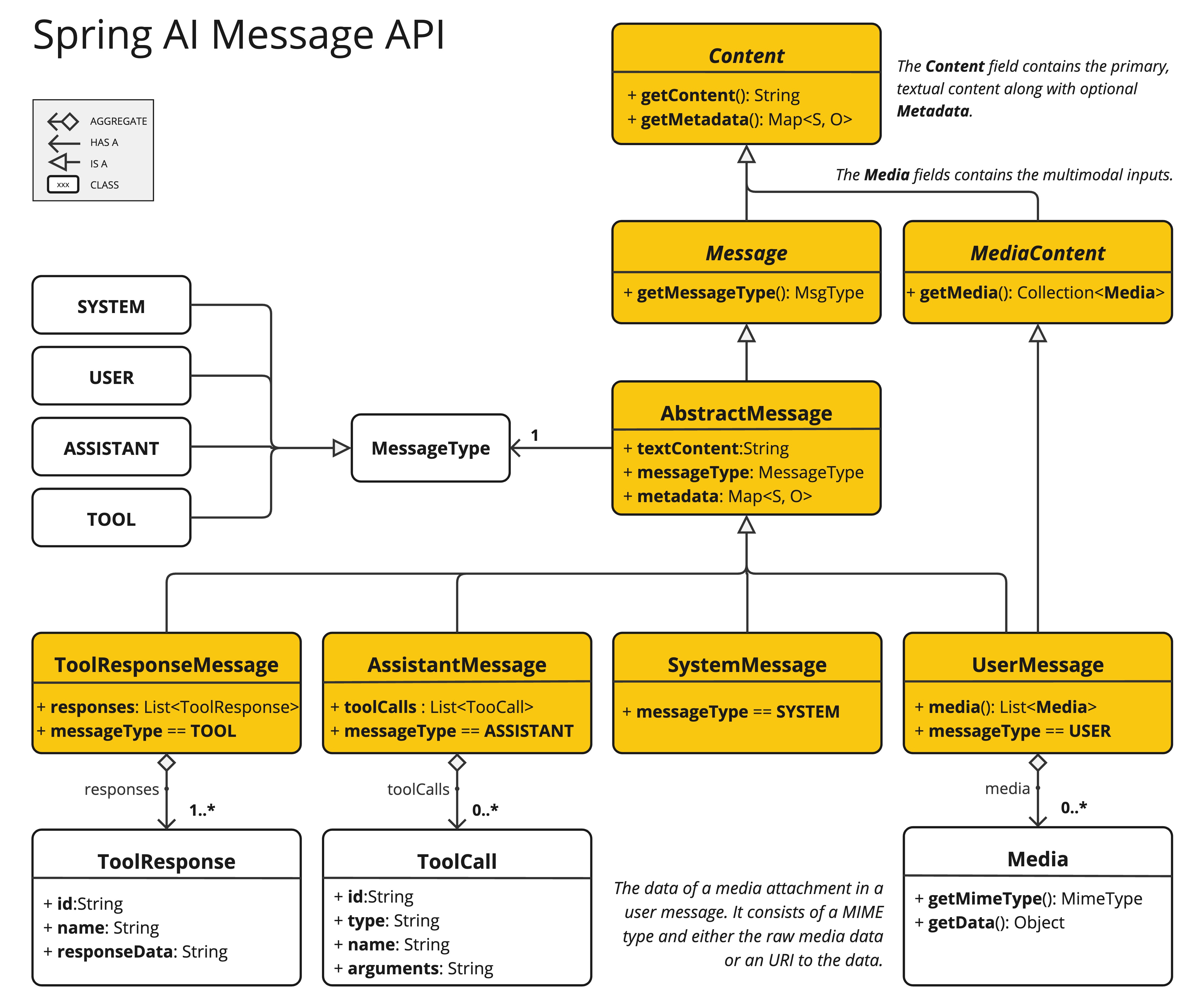 Now it fully supports OpenAI’s [Audio Input](https://docs.spring.io/spring-ai/reference/api/chat/openai-chat.html#_audio) and [Audio Output](https://docs.spring.io/spring-ai/reference/api/chat/openai-chat.html#_output_audio) modalities, thanks in large part to community member [Thomas Vitale](https://www.linkedin.com/in/vitalethomas/), who contributed to this feature's development.
### Setup
Follow the [Spring AI-OpenAI](https://docs.spring.io/spring-ai/reference/api/chat/openai-chat.html) integration documentation to prepare your environment.
### Audio Input
OpenAI’s [User Message API](https://platform.openai.com/docs/api-reference/chat/create#chat-create-messages) accepts base64-encoded audio files within messages using the [Media](https://github.com/spring-projects/spring-ai/blob/main/spring-ai-core/src/main/java/org/springframework/ai/chat/messages/Media.java) type. Supported formats include `audio/mp3` and `audio/wav`.
**Example: Adding audio to an input prompt:**
```java theme={null}
// Prepare the audio resource
var audioResource = new ClassPathResource("speech1.mp3");
// Create a user message with audio and send it to the chat model
String response = chatClient.prompt()
.user(u -> u.text("What is this recording about?")
.media(MimeTypeUtils.parseMimeType("audio/mp3"), audioResource))
.options(OpenAiChatOptions.builder()
.withModel(OpenAiApi.ChatModel.GPT_4_O_AUDIO_PREVIEW).build())
.call()
.content();
```
### Audio Output Generation
The OpenAI [Assistant Message API](https://platform.openai.com/docs/api-reference/chat/create#chat-create-messages) can return base64-encoded audio files using the `Media` type.
**Example: Generating audio output:**
```java theme={null}
// Generate an audio response
ChatResponse response = chatClient
.prompt("Tell me a joke about the Spring Framework")
.options(OpenAiChatOptions.builder()
.withModel(OpenAiApi.ChatModel.GPT_4_O_AUDIO_PREVIEW)
.withOutputModalities(List.of("text", "audio"))
.withOutputAudio(new AudioParameters(Voice.ALLOY, AudioResponseFormat.WAV))
.build())
.call()
.chatResponse();
// Access the audio transcript
String audioTranscript = response.getResult().getOutput().getContent();
// Retrieve the generated audio
byte[] generatedAudio = response.getResult().getOutput().getMedia().get(0).getDataAsByteArray();
```
To generate audio output, specify the audio modality in `OpenAiChatOptions`. Use the `AudioParameters` class to customize the voice and the audio format.
## [Voice ChatBot Demo](https://github.com/tzolov/voice-assistant-chatbot)
This example demonstrates building an interactive chatbot using Spring AI that supports input and output audio. It shows how AI can enhance user interaction with natural-sounding audio responses.
### Setup
Add the Spring AI OpenAI starter:
```xml theme={null}
Now it fully supports OpenAI’s [Audio Input](https://docs.spring.io/spring-ai/reference/api/chat/openai-chat.html#_audio) and [Audio Output](https://docs.spring.io/spring-ai/reference/api/chat/openai-chat.html#_output_audio) modalities, thanks in large part to community member [Thomas Vitale](https://www.linkedin.com/in/vitalethomas/), who contributed to this feature's development.
### Setup
Follow the [Spring AI-OpenAI](https://docs.spring.io/spring-ai/reference/api/chat/openai-chat.html) integration documentation to prepare your environment.
### Audio Input
OpenAI’s [User Message API](https://platform.openai.com/docs/api-reference/chat/create#chat-create-messages) accepts base64-encoded audio files within messages using the [Media](https://github.com/spring-projects/spring-ai/blob/main/spring-ai-core/src/main/java/org/springframework/ai/chat/messages/Media.java) type. Supported formats include `audio/mp3` and `audio/wav`.
**Example: Adding audio to an input prompt:**
```java theme={null}
// Prepare the audio resource
var audioResource = new ClassPathResource("speech1.mp3");
// Create a user message with audio and send it to the chat model
String response = chatClient.prompt()
.user(u -> u.text("What is this recording about?")
.media(MimeTypeUtils.parseMimeType("audio/mp3"), audioResource))
.options(OpenAiChatOptions.builder()
.withModel(OpenAiApi.ChatModel.GPT_4_O_AUDIO_PREVIEW).build())
.call()
.content();
```
### Audio Output Generation
The OpenAI [Assistant Message API](https://platform.openai.com/docs/api-reference/chat/create#chat-create-messages) can return base64-encoded audio files using the `Media` type.
**Example: Generating audio output:**
```java theme={null}
// Generate an audio response
ChatResponse response = chatClient
.prompt("Tell me a joke about the Spring Framework")
.options(OpenAiChatOptions.builder()
.withModel(OpenAiApi.ChatModel.GPT_4_O_AUDIO_PREVIEW)
.withOutputModalities(List.of("text", "audio"))
.withOutputAudio(new AudioParameters(Voice.ALLOY, AudioResponseFormat.WAV))
.build())
.call()
.chatResponse();
// Access the audio transcript
String audioTranscript = response.getResult().getOutput().getContent();
// Retrieve the generated audio
byte[] generatedAudio = response.getResult().getOutput().getMedia().get(0).getDataAsByteArray();
```
To generate audio output, specify the audio modality in `OpenAiChatOptions`. Use the `AudioParameters` class to customize the voice and the audio format.
## [Voice ChatBot Demo](https://github.com/tzolov/voice-assistant-chatbot)
This example demonstrates building an interactive chatbot using Spring AI that supports input and output audio. It shows how AI can enhance user interaction with natural-sounding audio responses.
### Setup
Add the Spring AI OpenAI starter:
```xml theme={null}