> ## Documentation Index
> Fetch the complete documentation index at: https://springaicommunity.mintlify.site/llms.txt
> Use this file to discover all available pages before exploring further.
# Introducing Spring AI Amazon Bedrock Nova Integration via Converse API
> The [Amazon Bedrock Nova](https://docs.aws.amazon.com/nova/latest/userguide/what-is-nova.html) models represent a new generation of foundation models supporting...
The [Amazon Bedrock Nova](https://docs.aws.amazon.com/nova/latest/userguide/what-is-nova.html) models represent a new generation of foundation models supporting a broad range of use cases, from text and image understanding to video-to-text analysis.
With the [Spring AI Bedrock Converse API](https://docs.spring.io/spring-ai/reference/api/chat/bedrock-converse.html) integration, developers can seamlessly connect to these advanced Nova models and build sophisticated conversational applications with minimal effort.
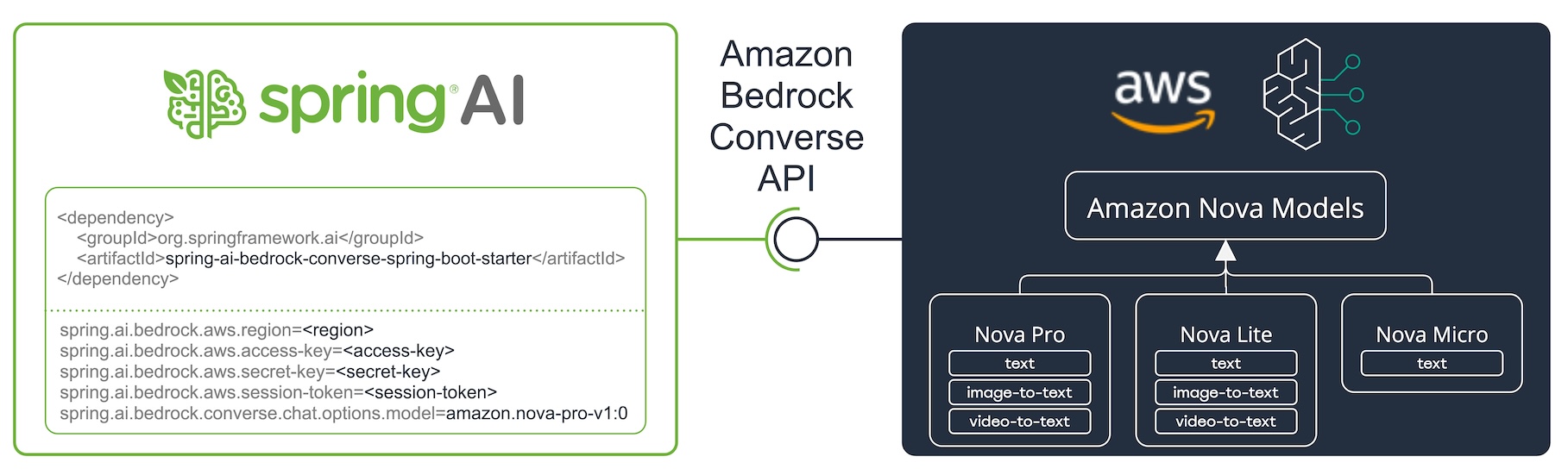 This blog post introduces the key features of Amazon Nova models, demonstrates their integration with Spring AI's Bedrock Converse API, and provides practical examples for text, image, video, document processing, and function calling.
## What are Amazon Nova Models?
Amazon Nova offers three tiers of models—Nova Pro, Nova Lite, and Nova Micro—to address different performance and cost requirements:
| Specification | Nova Pro | Nova Lite | Nova Micro |
| ------------- | -------------------------- | -------------------------- | ---------------------- |
| Modalities | Text, Image, Video-to-text | Text, Image, Video-to-text | Text |
| Model ID | amazon.nova-pro-v1:0 | amazon.nova-lite-v1:0 | amazon.nova-micro-v1:0 |
| Max tokens | 300K | 300K | 128K |
Nova Pro and Lite support multimodal capabilities, including text, image, and video inputs, while Nova Micro is optimized for text-only interactions at a lower cost.
## Setting Up the Integration
### Prerequisites
1. **AWS Configuration**: You need:
* AWS credentials with access to Amazon Bedrock
* Necessary permissions to use Nova models
* Models enabled in the [Amazon Bedrock console](https://us-east-1.console.aws.amazon.com/bedrock/home?region=us-east-1#/modelaccess)
2. **Spring AI Dependency**:
Add the Spring AI Bedrock Converse starter to your Spring Boot project:
**Maven**:
```xml theme={null}
org.springframework.ai
spring-ai-bedrock-converse-spring-boot-starter
```
**Gradle**:
```groovy theme={null}
dependencies {
implementation 'org.springframework.ai:spring-ai-bedrock-converse-spring-boot-starter'
}
```
3. **Application Configuration**:
Configure `application.properties` for Amazon Bedrock:
```properties theme={null}
spring.ai.bedrock.aws.region=us-east-1
spring.ai.bedrock.aws.access-key=${AWS_ACCESS_KEY_ID}
spring.ai.bedrock.aws.secret-key=${AWS_SECRET_ACCESS_KEY}
spring.ai.bedrock.aws.session-token=${AWS_SESSION_TOKEN}
spring.ai.bedrock.converse.chat.options.model=amazon.nova-pro-v1:0
spring.ai.bedrock.converse.chat.options.temperature=0.8
spring.ai.bedrock.converse.chat.options.max-tokens=1000
```
For more details, refer to the [Chat Properties](https://docs.spring.io/spring-ai/reference/api/chat/bedrock-converse.html#_chat_properties) documentation.
## Key Features of the Bedrock Nova Integration
### 1. Text Completion
Text-based chat completion is straightforward:
```java theme={null}
String response = ChatClient.create(chatModel)
.prompt("Tell me a joke about AI.")
.call()
.content();
```
### 2. Multimodal Input
Nova Pro and Lite support multimodal inputs, enabling text and visual data processing. Spring AI provides a portable [Multimodal API](https://docs.spring.io/spring-ai/reference/api/multimodality.html) that supports Bedrock Nova models.
#### Text + Image
Nova Pro and Lite support multiple [image modalities](https://docs.aws.amazon.com/nova/latest/userguide/modalities-image.html). These models can analyze images, answer questions about them, classify them, and generate summaries based on provided instructions. They support base64-encoded images in `image/jpeg`, `image/png`, `image/gif`, and `image/webp` formats.
Example combining user text with an image:
```java theme={null}
String response = ChatClient.create(chatModel)
.prompt()
.user(u -> u.text("Explain what do you see on this picture?")
.media(Media.Format.IMAGE_PNG, new ClassPathResource("/test.png")))
.call()
.content();
```
This code processes the `test.png` image:
This blog post introduces the key features of Amazon Nova models, demonstrates their integration with Spring AI's Bedrock Converse API, and provides practical examples for text, image, video, document processing, and function calling.
## What are Amazon Nova Models?
Amazon Nova offers three tiers of models—Nova Pro, Nova Lite, and Nova Micro—to address different performance and cost requirements:
| Specification | Nova Pro | Nova Lite | Nova Micro |
| ------------- | -------------------------- | -------------------------- | ---------------------- |
| Modalities | Text, Image, Video-to-text | Text, Image, Video-to-text | Text |
| Model ID | amazon.nova-pro-v1:0 | amazon.nova-lite-v1:0 | amazon.nova-micro-v1:0 |
| Max tokens | 300K | 300K | 128K |
Nova Pro and Lite support multimodal capabilities, including text, image, and video inputs, while Nova Micro is optimized for text-only interactions at a lower cost.
## Setting Up the Integration
### Prerequisites
1. **AWS Configuration**: You need:
* AWS credentials with access to Amazon Bedrock
* Necessary permissions to use Nova models
* Models enabled in the [Amazon Bedrock console](https://us-east-1.console.aws.amazon.com/bedrock/home?region=us-east-1#/modelaccess)
2. **Spring AI Dependency**:
Add the Spring AI Bedrock Converse starter to your Spring Boot project:
**Maven**:
```xml theme={null}
org.springframework.ai
spring-ai-bedrock-converse-spring-boot-starter
```
**Gradle**:
```groovy theme={null}
dependencies {
implementation 'org.springframework.ai:spring-ai-bedrock-converse-spring-boot-starter'
}
```
3. **Application Configuration**:
Configure `application.properties` for Amazon Bedrock:
```properties theme={null}
spring.ai.bedrock.aws.region=us-east-1
spring.ai.bedrock.aws.access-key=${AWS_ACCESS_KEY_ID}
spring.ai.bedrock.aws.secret-key=${AWS_SECRET_ACCESS_KEY}
spring.ai.bedrock.aws.session-token=${AWS_SESSION_TOKEN}
spring.ai.bedrock.converse.chat.options.model=amazon.nova-pro-v1:0
spring.ai.bedrock.converse.chat.options.temperature=0.8
spring.ai.bedrock.converse.chat.options.max-tokens=1000
```
For more details, refer to the [Chat Properties](https://docs.spring.io/spring-ai/reference/api/chat/bedrock-converse.html#_chat_properties) documentation.
## Key Features of the Bedrock Nova Integration
### 1. Text Completion
Text-based chat completion is straightforward:
```java theme={null}
String response = ChatClient.create(chatModel)
.prompt("Tell me a joke about AI.")
.call()
.content();
```
### 2. Multimodal Input
Nova Pro and Lite support multimodal inputs, enabling text and visual data processing. Spring AI provides a portable [Multimodal API](https://docs.spring.io/spring-ai/reference/api/multimodality.html) that supports Bedrock Nova models.
#### Text + Image
Nova Pro and Lite support multiple [image modalities](https://docs.aws.amazon.com/nova/latest/userguide/modalities-image.html). These models can analyze images, answer questions about them, classify them, and generate summaries based on provided instructions. They support base64-encoded images in `image/jpeg`, `image/png`, `image/gif`, and `image/webp` formats.
Example combining user text with an image:
```java theme={null}
String response = ChatClient.create(chatModel)
.prompt()
.user(u -> u.text("Explain what do you see on this picture?")
.media(Media.Format.IMAGE_PNG, new ClassPathResource("/test.png")))
.call()
.content();
```
This code processes the `test.png` image:
 with the text message `"Explain what do you see on this picture?"` and generates a response like:
> The image shows a close-up view of a wire fruit basket containing several pieces of fruit...
#### Text + Video
Amazon Nova Pro/Lite models support a single [video modality](https://docs.aws.amazon.com/nova/latest/userguide/modalities-video.html) in the payload, provided either in base64 format or through an Amazon S3 URI.
Supported video formats include `video/x-matros`, `video/quicktime`, `video/mp4`, `video/webm`, `video/x-flv`, `video/mpeg`, `video/x-ms-wmv`, and `image/3gpp`.
Example combining user text with a video:
```java theme={null}
String response = ChatClient.create(chatModel)
.prompt()
.user(u -> u.text("Explain what do you see in this video?")
.media(Media.Format.VIDEO_MP4, new ClassPathResource("/test.video.mp4")))
.call()
.content();
```
This code processes the `test.video.mp4` video
with the text message `"Explain what do you see on this picture?"` and generates a response like:
> The image shows a close-up view of a wire fruit basket containing several pieces of fruit...
#### Text + Video
Amazon Nova Pro/Lite models support a single [video modality](https://docs.aws.amazon.com/nova/latest/userguide/modalities-video.html) in the payload, provided either in base64 format or through an Amazon S3 URI.
Supported video formats include `video/x-matros`, `video/quicktime`, `video/mp4`, `video/webm`, `video/x-flv`, `video/mpeg`, `video/x-ms-wmv`, and `image/3gpp`.
Example combining user text with a video:
```java theme={null}
String response = ChatClient.create(chatModel)
.prompt()
.user(u -> u.text("Explain what do you see in this video?")
.media(Media.Format.VIDEO_MP4, new ClassPathResource("/test.video.mp4")))
.call()
.content();
```
This code processes the `test.video.mp4` video 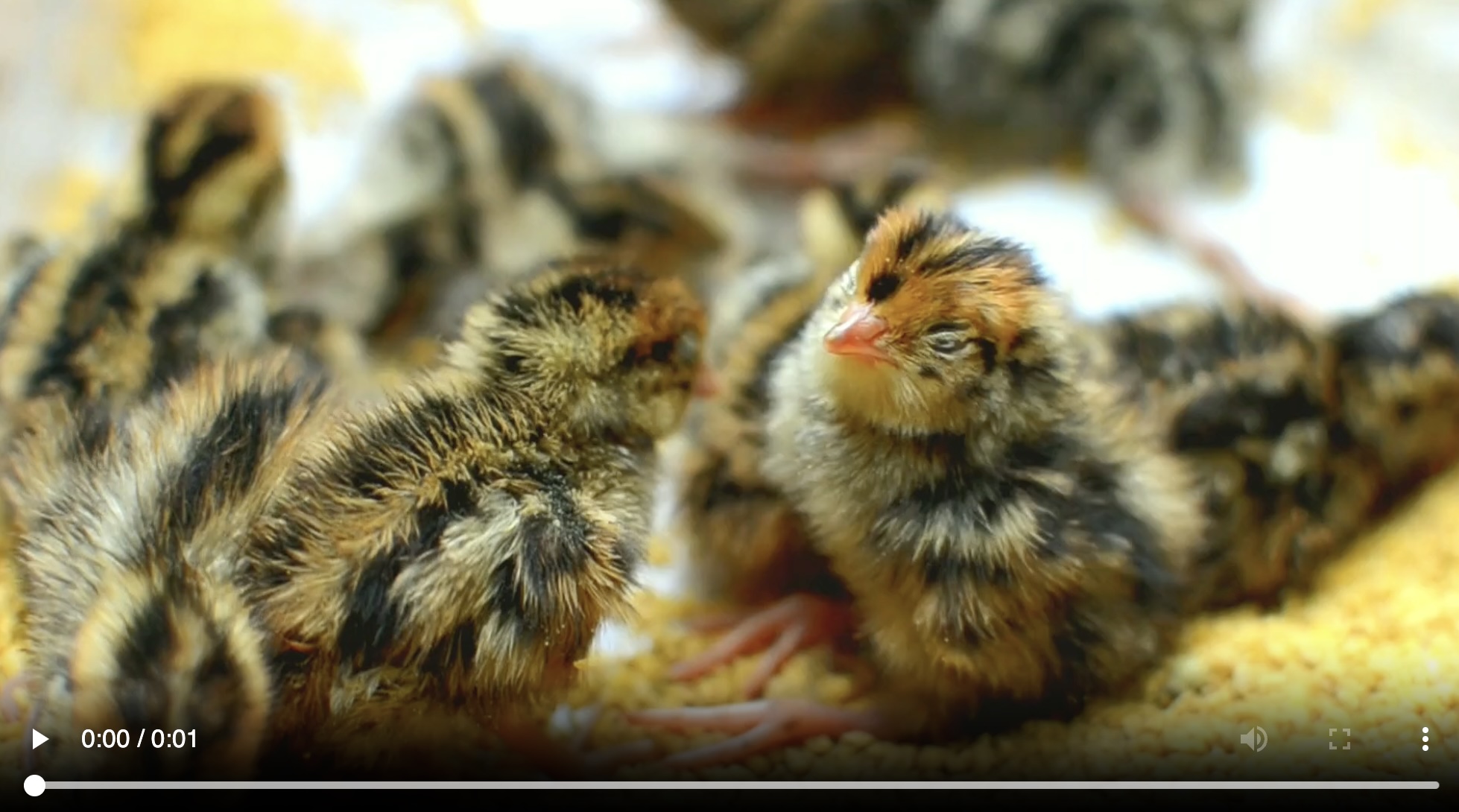 with the text message `"Explain what do you see in this video?"` and generates a response like:
> The video shows a group of baby chickens, also known as chicks, huddled together on a surface ...
#### Text + Document
Nova Pro/Lite supports [document modalities](https://docs.aws.amazon.com/nova/latest/userguide/modalities-document.html) in two variants:
* Text document types (txt, csv, html, md, etc.) for text understanding and answering questions based on textual elements
* Media document types (pdf, docx, xlsx) for vision-based understanding, such as analyzing charts and graphs
Example combining user text with a media document:
```java theme={null}
String response = ChatClient.create(chatModel)
.prompt()
.user(u -> u.text(
"You are a very professional document summarization specialist. Please summarize the given document.")
.media(Media.Format.DOC_PDF, new ClassPathResource("/spring-ai-reference-overview.pdf")))
.call()
.content();
```
This code processes the `spring-ai-reference-overview.pdf` document:
with the text message `"Explain what do you see in this video?"` and generates a response like:
> The video shows a group of baby chickens, also known as chicks, huddled together on a surface ...
#### Text + Document
Nova Pro/Lite supports [document modalities](https://docs.aws.amazon.com/nova/latest/userguide/modalities-document.html) in two variants:
* Text document types (txt, csv, html, md, etc.) for text understanding and answering questions based on textual elements
* Media document types (pdf, docx, xlsx) for vision-based understanding, such as analyzing charts and graphs
Example combining user text with a media document:
```java theme={null}
String response = ChatClient.create(chatModel)
.prompt()
.user(u -> u.text(
"You are a very professional document summarization specialist. Please summarize the given document.")
.media(Media.Format.DOC_PDF, new ClassPathResource("/spring-ai-reference-overview.pdf")))
.call()
.content();
```
This code processes the `spring-ai-reference-overview.pdf` document: 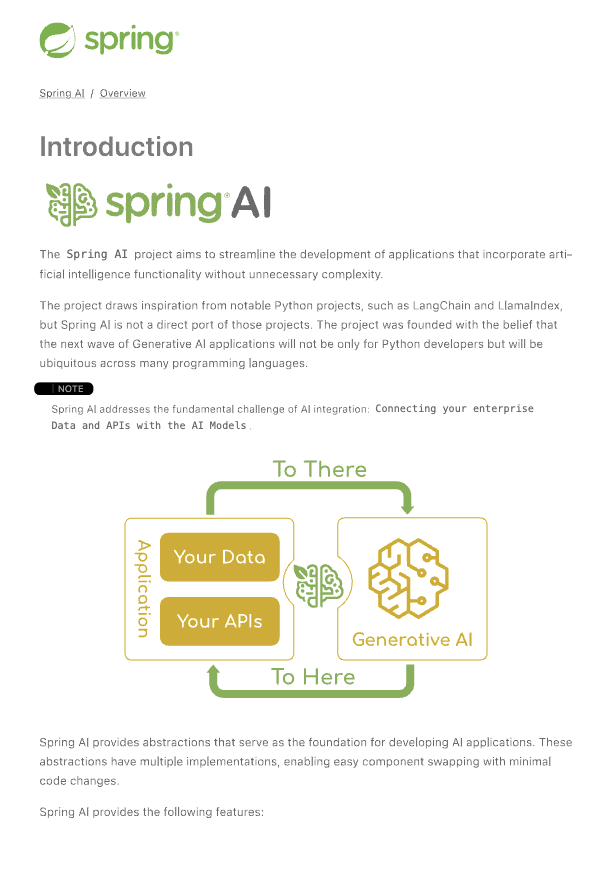 with the text message and generates a response like:
> **Introduction:**
>
> * Spring AI is designed to simplify the development of applications with artificial intelligence (AI) capabilities, aiming to avoid unnecessary complexity....
### 3. Function Calling
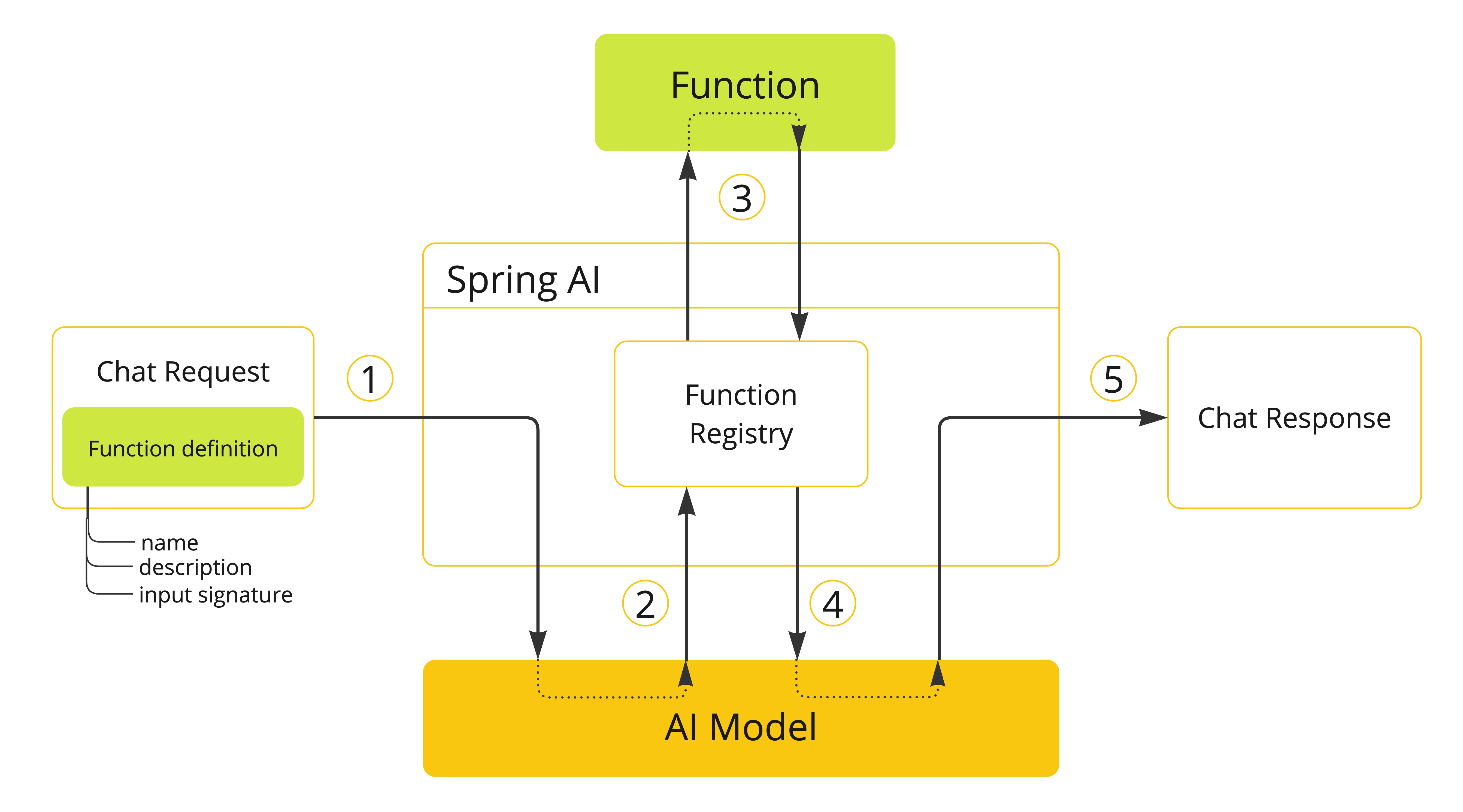
Nova models support [Tool/Function Calling](https://docs.spring.io/spring-ai/reference/api/functions.html) for integration with external tools.
with the text message and generates a response like:
> **Introduction:**
>
> * Spring AI is designed to simplify the development of applications with artificial intelligence (AI) capabilities, aiming to avoid unnecessary complexity....
### 3. Function Calling
Nova models support [Tool/Function Calling](https://docs.spring.io/spring-ai/reference/api/functions.html) for integration with external tools.
 #### Define a Function
```java theme={null}
@Bean
@Description("Get the weather in a location. Return temperature in Celsius or Fahrenheit.")
public Function weatherFunction() {
return new MockWeatherService();
}
```
#### Use the Function in a Chat Prompt
```java theme={null}
String response = ChatClient.create(this.chatModel)
.prompt("What's the weather like in Boston?")
.function("weatherFunction") // bean name
.inputType(WeatherRequest.class)
.call()
.content();
```
## Resources
#### Getting Started
* [Spring AI Documentation](https://docs.spring.io/spring-ai/reference/index.html) - Comprehensive guide to Spring AI
* [Spring AI Bedrock Converse API Guide](https://docs.spring.io/spring-ai/reference/api/chat/bedrock-converse.html) - Detailed API documentation
#### Amazon Bedrock Resources
* [Amazon Bedrock Nova Documentation](https://docs.aws.amazon.com/nova/latest/userguide/what-is-nova.html) - Official Nova models documentation
* [Amazon Bedrock Console](https://us-east-1.console.aws.amazon.com/bedrock/home) - Manage and monitor your Bedrock resources
* [Nova Model Capabilities](https://docs.aws.amazon.com/bedrock/latest/userguide/model-parameters.html) - Detailed information about Nova model parameters and capabilities
#### Code Examples
* [Spring AI Bedrock Nova Demo](https://github.com/tzolov/spring-ai-bedrock-nova-demo) - Complete example project showcasing integration features
* [BedrockNovaChatClientIT.java](https://github.com/spring-projects/spring-ai/blob/main/models/spring-ai-bedrock-converse/src/test/java/org/springframework/ai/bedrock/converse/client/BedrockNovaChatClientIT.java) - Integration test examples
* [Spring AI Samples Repository](https://github.com/spring-projects/spring-ai/tree/main/spring-ai-samples) - Additional code samples and use cases
## Tanzu AI Server
[VMware Tanzu Platform 10](https://blogs.vmware.com/tanzu/broadcom-announces-the-general-availability-of-vmware-tanzu-platform-10-making-it-easier-for-customers-to-build-and-launch-new-applications-in-the-private-cloud/) integrates Amazon Bedrock Nova models through the VMware Tanzu AI Server, powered by Spring AI.
This integration provides:
* **Enterprise-Grade AI Deployment**: Production-ready solution for deploying AI applications within your VMware Tanzu environment
* **Simplified Model Access**: Streamlined access to Amazon Bedrock Nova models through a unified interface
* **Security and Governance**: Enterprise-level security controls and governance features
* **Scalable Infrastructure**: Built on Spring AI, the integration supports for scalable deployment of AI applications while maintaining high performance
For more information about deploying AI applications with Tanzu AI Server, visit the [VMware Tanzu AI documentation](https://www.vmware.com/solutions/app-platform/ai).
## Conclusion
The integration of Spring AI with Amazon Bedrock Nova models via the Converse API enables powerful capabilities for building advanced conversational applications. Nova Pro and Lite provide comprehensive tools for developing multimodal experiences across text, images, videos, and documents. Function calling extends these capabilities further by enabling interaction with external tools and services.
Start building advanced AI applications with Nova models and Spring AI today!
#### Define a Function
```java theme={null}
@Bean
@Description("Get the weather in a location. Return temperature in Celsius or Fahrenheit.")
public Function weatherFunction() {
return new MockWeatherService();
}
```
#### Use the Function in a Chat Prompt
```java theme={null}
String response = ChatClient.create(this.chatModel)
.prompt("What's the weather like in Boston?")
.function("weatherFunction") // bean name
.inputType(WeatherRequest.class)
.call()
.content();
```
## Resources
#### Getting Started
* [Spring AI Documentation](https://docs.spring.io/spring-ai/reference/index.html) - Comprehensive guide to Spring AI
* [Spring AI Bedrock Converse API Guide](https://docs.spring.io/spring-ai/reference/api/chat/bedrock-converse.html) - Detailed API documentation
#### Amazon Bedrock Resources
* [Amazon Bedrock Nova Documentation](https://docs.aws.amazon.com/nova/latest/userguide/what-is-nova.html) - Official Nova models documentation
* [Amazon Bedrock Console](https://us-east-1.console.aws.amazon.com/bedrock/home) - Manage and monitor your Bedrock resources
* [Nova Model Capabilities](https://docs.aws.amazon.com/bedrock/latest/userguide/model-parameters.html) - Detailed information about Nova model parameters and capabilities
#### Code Examples
* [Spring AI Bedrock Nova Demo](https://github.com/tzolov/spring-ai-bedrock-nova-demo) - Complete example project showcasing integration features
* [BedrockNovaChatClientIT.java](https://github.com/spring-projects/spring-ai/blob/main/models/spring-ai-bedrock-converse/src/test/java/org/springframework/ai/bedrock/converse/client/BedrockNovaChatClientIT.java) - Integration test examples
* [Spring AI Samples Repository](https://github.com/spring-projects/spring-ai/tree/main/spring-ai-samples) - Additional code samples and use cases
## Tanzu AI Server
[VMware Tanzu Platform 10](https://blogs.vmware.com/tanzu/broadcom-announces-the-general-availability-of-vmware-tanzu-platform-10-making-it-easier-for-customers-to-build-and-launch-new-applications-in-the-private-cloud/) integrates Amazon Bedrock Nova models through the VMware Tanzu AI Server, powered by Spring AI.
This integration provides:
* **Enterprise-Grade AI Deployment**: Production-ready solution for deploying AI applications within your VMware Tanzu environment
* **Simplified Model Access**: Streamlined access to Amazon Bedrock Nova models through a unified interface
* **Security and Governance**: Enterprise-level security controls and governance features
* **Scalable Infrastructure**: Built on Spring AI, the integration supports for scalable deployment of AI applications while maintaining high performance
For more information about deploying AI applications with Tanzu AI Server, visit the [VMware Tanzu AI documentation](https://www.vmware.com/solutions/app-platform/ai).
## Conclusion
The integration of Spring AI with Amazon Bedrock Nova models via the Converse API enables powerful capabilities for building advanced conversational applications. Nova Pro and Lite provide comprehensive tools for developing multimodal experiences across text, images, videos, and documents. Function calling extends these capabilities further by enabling interaction with external tools and services.
Start building advanced AI applications with Nova models and Spring AI today!