> ## Documentation Index
> Fetch the complete documentation index at: https://springaicommunity.mintlify.site/llms.txt
> Use this file to discover all available pages before exploring further.
# Connect Your AI to Everything: Spring AI's MCP Boot Starters
> The Model Context Protocol (MCP) standardizes how AI applications interact with external tools and resources.
 The Model Context Protocol (MCP) standardizes how AI applications interact with external tools and resources.
Spring joined the MCP ecosystem early as a key contributor, helping to develop and maintain the [official MCP Java SDK](https://modelcontextprotocol.io/sdk/java/mcp-overview) that serves as the foundation for Java-based MCP implementations.
Building on this contribution, Spring AI has embraced MCP with comprehensive support through dedicated [Boot Starters](https://docs.spring.io/spring-ai/reference/1.1-SNAPSHOT/api/mcp/mcp-overview.html#_spring_ai_mcp_integration) and [MCP Java Annotations](https://docs.spring.io/spring-ai/reference/1.1-SNAPSHOT/api/mcp/mcp-annotations-overview.html), making it easier than ever to build sophisticated AI-powered applications that can seamlessly connect to external systems.
This blog introduces core MCP components and demonstrates building both MCP Servers and Clients using Spring AI, showcasing basic and advanced features. The complete source code is available at: [MCP Weather Example](https://github.com/tzolov/spring-ai-mcp-blogpost).
> **Note:** This content applies only to Spring AI `1.1.0-SNAPSHOT` or Spring `AI 1.1.0-M1+` versions.
## What is the Model Context Protocol?
The [Model Context Protocol (MCP)](https://modelcontextprotocol.org/docs/concepts/architecture) is a standardized protocol that enables AI models to interact with external tools and resources in a structured way.
Think of it as a bridge between your AI models and the real world - allowing them to access databases, APIs, file systems, and other external services through a consistent interface.
You can bootstrap AI applications with MCP support using [Spring Initializr](https://start.spring.io).
For comprehensive details, see the [Spring AI MCP Overview](https://docs.spring.io/spring-ai/reference/1.1-SNAPSHOT/api/mcp/mcp-overview.html) documentation.
### MCP Client-Server Architecture
The Model Context Protocol (MCP) standardizes how AI applications interact with external tools and resources.
Spring joined the MCP ecosystem early as a key contributor, helping to develop and maintain the [official MCP Java SDK](https://modelcontextprotocol.io/sdk/java/mcp-overview) that serves as the foundation for Java-based MCP implementations.
Building on this contribution, Spring AI has embraced MCP with comprehensive support through dedicated [Boot Starters](https://docs.spring.io/spring-ai/reference/1.1-SNAPSHOT/api/mcp/mcp-overview.html#_spring_ai_mcp_integration) and [MCP Java Annotations](https://docs.spring.io/spring-ai/reference/1.1-SNAPSHOT/api/mcp/mcp-annotations-overview.html), making it easier than ever to build sophisticated AI-powered applications that can seamlessly connect to external systems.
This blog introduces core MCP components and demonstrates building both MCP Servers and Clients using Spring AI, showcasing basic and advanced features. The complete source code is available at: [MCP Weather Example](https://github.com/tzolov/spring-ai-mcp-blogpost).
> **Note:** This content applies only to Spring AI `1.1.0-SNAPSHOT` or Spring `AI 1.1.0-M1+` versions.
## What is the Model Context Protocol?
The [Model Context Protocol (MCP)](https://modelcontextprotocol.org/docs/concepts/architecture) is a standardized protocol that enables AI models to interact with external tools and resources in a structured way.
Think of it as a bridge between your AI models and the real world - allowing them to access databases, APIs, file systems, and other external services through a consistent interface.
You can bootstrap AI applications with MCP support using [Spring Initializr](https://start.spring.io).
For comprehensive details, see the [Spring AI MCP Overview](https://docs.spring.io/spring-ai/reference/1.1-SNAPSHOT/api/mcp/mcp-overview.html) documentation.
### MCP Client-Server Architecture
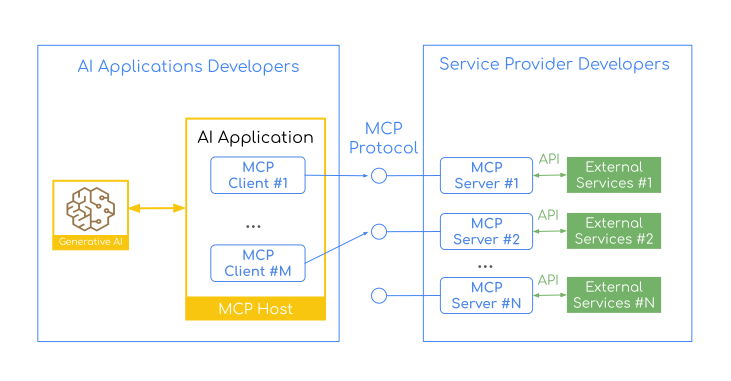
The Model Context Protocol follows a Client-Server architecture that ensures a clear separation of concerns.
The MCP Server exposes specific capabilities (tools, resources, prompts) from third-party services.
MCP clients are instantiated by host applications to communicate with particular MCP servers. Each client handles one direct communication with one server.
The Host is the AI application users interact with, while clients are the protocol-level components that enable server connections.
The MCP protocol ensures complete, language-agnostic interoperability between clients and servers.
You can have Clients written in Java, Python, or TypeScript communicating with servers in any language and vice versa.
This architecture establishes distinct boundaries and responsibilities between client and server-side development, naturally creating two distinct developer communities:
**AI Application/Host Developers**
Handle the complexity of orchestrating multiple MCP servers (connected via MCP Clients) and integrating with AI models. AI developers build AI applications that:
* Use MCP Clients to consume capabilities from multiple MCP Servers
* Handle AI model integration and prompt engineering
* Manage conversation context and user interactions
* Orchestrate complex workflows across different services
* Focus on creating compelling user experiences
**MCP Server (Provider) Developers**
Focus on exposing specific capabilities (tools, resources, prompts) from third-party services as MCP Servers. Server developers create servers that:
* Wrap third-party services and APIs (databases, file systems, external APIs)
* Expose service capabilities through standardized MCP primitives (tools, resources, prompts)
* Handle authentication and authorization for their specific services
Such separation ensures that Server developers can concentrate on wrapping their domain-specific services without worrying about AI orchestration. At the same time the AI application developers can leverage existing MCP servers without understanding the intricacies of each third-party service.
The division of labor means that a database expert can create an MCP server for PostgreSQL without needing to understand LLM prompting, while an AI application developer can use that PostgreSQL server without knowing SQL internals. The MCP protocol acts as the universal language between them.
**Spring AI** embraces this architecture with [MCP Client](https://docs.spring.io/spring-ai/reference/1.1-SNAPSHOT/api/mcp/mcp-client-boot-starter-docs.html) and [MCP Server](https://docs.spring.io/spring-ai/reference/1.1-SNAPSHOT/api/mcp/mcp-server-boot-starter-docs.html) Boot Starters.
This means Spring developers can participate in both sides of the MCP ecosystem - building AI applications that consume MCP servers and creating MCP servers that expose Spring-based services to the wider AI community.
### MCP Features
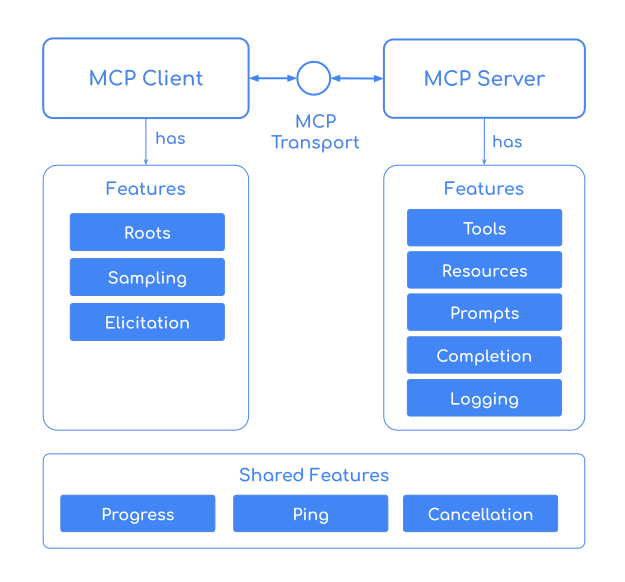
Shared between the Client and the Server, MCP provides an extensive set of features that enable seamless communication between AI applications and external services:
* Expose [tools](https://modelcontextprotocol.io/specification/2025-06-18/server/tools) that AI models can invoke
* Share [resources](https://modelcontextprotocol.io/specification/2025-06-18/server/resources) and data with AI applications
* Provide [prompt](https://modelcontextprotocol.io/specification/2025-06-18/server/prompts) templates for consistent interactions
* Offers argument [autocompletion](https://modelcontextprotocol.io/specification/2025-06-18/server/utilities/completion) suggestions for prompts and resource URIs
* Handle real-time notifications and [progress](https://modelcontextprotocol.io/specification/2025-06-18/basic/utilities/progress) updates
* Support client-side [sampling](https://modelcontextprotocol.io/specification/2025-06-18/client/sampling), [elicitation](https://modelcontextprotocol.io/specification/2025-06-18/client/elicitation), [structured logging](https://modelcontextprotocol.io/specification/2025-06-18/server/utilities/logging) and [progress tracking](https://modelcontextprotocol.io/specification/2025-06-18/basic/utilities/progress)
* Support various transport protocols: [STDIO](http://localhost:3000/specification/2025-06-18/basic/transports#stdio), [Streamable-HTTP](http://localhost:3000/specification/2025-06-18/basic/transports#streamable-http), and [SSE](http://localhost:3000/specification/2024-11-05/basic/transports#http-with-sse)
> **Important:** Tools are owned by the LLM, unlike other MCP features such as prompts and resources. The LLM—not the Host—decides if, when, and in what order to call tools. The Host only controls which tool descriptions are offered to the LLM.
#### Client Features
MCP Clients enable AI applications to consume capabilities from MCP Servers:
* **Roots**: Expose filesystem "roots" to servers
* **Sampling**: Standardized way for servers to request LLM sampling from LLMS via clients
* **Elicitation**: Standardized way for servers to request additional information from users through the client during interactions.
* **Progress Tracking Listener**: Monitor long-running operations with real-time progress updates
* **Structured Logging Listener**: Receive detailed log messages from servers for debugging and monitoring
* **Change Notifications Listeners**: Get notified when server capabilities (tools, resources, prompts) are updated
#### Server Features
MCP Servers expose capabilities and services to AI applications:
* **Tools**: Publish functions that AI models can invoke through standardized interfaces
* **Resources**: Provide access to data sources, files, and external systems
* **Prompts**: Share reusable prompt templates with parameter support
* **Completion**: Argument autocompletion suggestions for prompts and resource URIs
* **Real-time Notifications**: Send updates about capability changes to connected clients
* **Progress Reporting**: Emit progress updates for long-running operations
* **Structured Logging**: Send detailed log messages to clients for transparency
## Build an MCP Server
Let's build a [Streamable-HTTP MCP Server](https://docs.spring.io/spring-ai/reference/1.1-SNAPSHOT/api/mcp/mcp-streamable-http-server-boot-starter-docs.html) that provides real-time weather forecast information.
#### Spring Boot Server application
Create a new (`mcp-weather-server`) Spring Boot application:
```java theme={null}
@SpringBootApplication
public class McpServerApplication {
public static void main(String[] args) {
SpringApplication.run(McpServerApplication.class, args);
}
}
```
with Spring AI MCP Server dependency:
```xml theme={null}
org.springframework.ai
spring-ai-starter-mcp-server-webmvc
```
```bash theme={null}
spring.ai.mcp.server.protocol=STREAMABLE
```
You can start the server with either `STREAMABLE`, `STATELESS` or `SSE` transport.
To enable the `STDIO` transport you need to set `spring.ai.mcp.server.stdio=true`.
#### Weather Service
Leverage the free [Weather REST API](https://open-meteo.com/) to build a service that can retrieve weather forecasts by location coordinates.
Add @McpTool and @McpToolParam annotations to register the `getTemperature` method as an MCP Server Tool:
```java theme={null}
@Service
public class WeatherService {
public record WeatherResponse(Current current) {
public record Current(LocalDateTime time, int interval, double temperature_2m) {}
}
@McpTool(description = "Get the temperature (in celsius) for a specific location")
public WeatherResponse getTemperature(
@McpToolParam(description = "The location latitude") double latitude,
@McpToolParam(description = "The location longitude") double longitude) {
return RestClient.create()
.get()
.uri("https://api.open-meteo.com/v1/forecast?latitude={latitude}&longitude={longitude}¤t=temperature_2m",
latitude, longitude)
.retrieve()
.body(WeatherResponse.class);
}
}
```
#### Build & Run
```bash theme={null}
./mvnw clean install -DskipTests
java -jar target/mcp-weather-server-0.0.1-SNAPSHOT.jar
```
This starts the mcp-weather-server on port `8080`.
#### Using the MCP Server
Once the MCP Weather Server is up and running, you can interact with it using various MCP compliant client applications:
**[MCP Inspector](https://modelcontextprotocol.io/legacy/tools/inspector)**
The MCP Inspector is an interactive developer tool for testing and debugging MCP servers.
To start the inspector run:
```bash theme={null}
npx @modelcontextprotocol/inspector
```
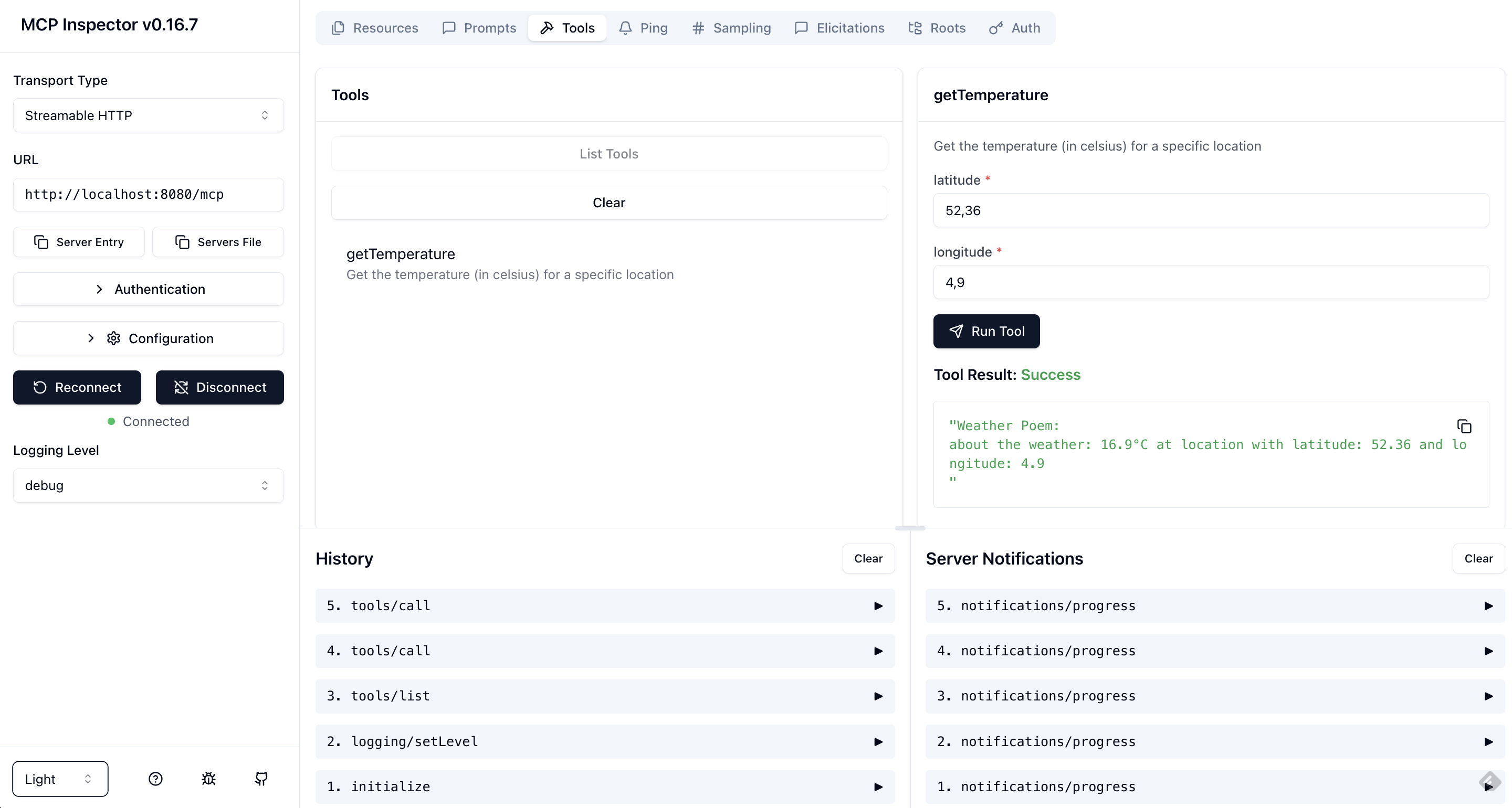
In the browser UI, set the Transport Type to `Streamable HTTP` and the URL to `http://localhost:8080/mcp`.
Click `Connect` to establish the connection.
Then list the tools and run the getTemperature.
**[MCP Java SDK](https://modelcontextprotocol.io/sdk/java/mcp-client#client-features)**
Use the MCP Java SDK client to programmatically connect to the server:
```java theme={null}
var client = McpClient.sync(
HttpClientStreamableHttpTransport
.builder("http://localhost:8080").build())
.build();
client.initialize();
CallToolResult weather = client.callTool(
new CallToolRequest("getTemperature",
Map.of("latitude", "47.6062",
"longitude", "-122.3321")));
```
**Other MCP compliant AI Applications/SDKs**
Connect your MCP server to popular AI applications:
* [Cline](https://docs.cline.bot/mcp/mcp-overview) - AI coding assistant for VS Code
* [VS Code MCP](https://code.visualstudio.com/docs/copilot/customization/mcp-servers) - GitHub Copilot MCP integration
* [Cursor MCP](https://docs.cursor.com/en/context/mcp)
* [Non-Java MCP client](https://modelcontextprotocol.io/docs/develop/build-client) - Build MCP Client using with other (non-Java) SDKs
* ...
**[Claude Desktop](https://claude.ai/download)**
To integrate with Claude Desktop, using the local [STDIO transport](https://modelcontextprotocol.io/specification/2025-06-18/basic/transports#stdio), add the following configuration to your Claude Desktop settings:
```json theme={null}
{
"mcpServers": {
"spring-ai-mcp-weather": {
"command": "java",
"args": [
"-Dspring.ai.mcp.server.stdio=true",
"-Dspring.main.web-application-type=none",
"-Dlogging.pattern.console=",
"-jar",
"/path/to/mcp-weather-server-0.0.1.jar"]
}
}
}
```
*Replace `/absolute/path/to/` with the actual path to your built JAR file.*
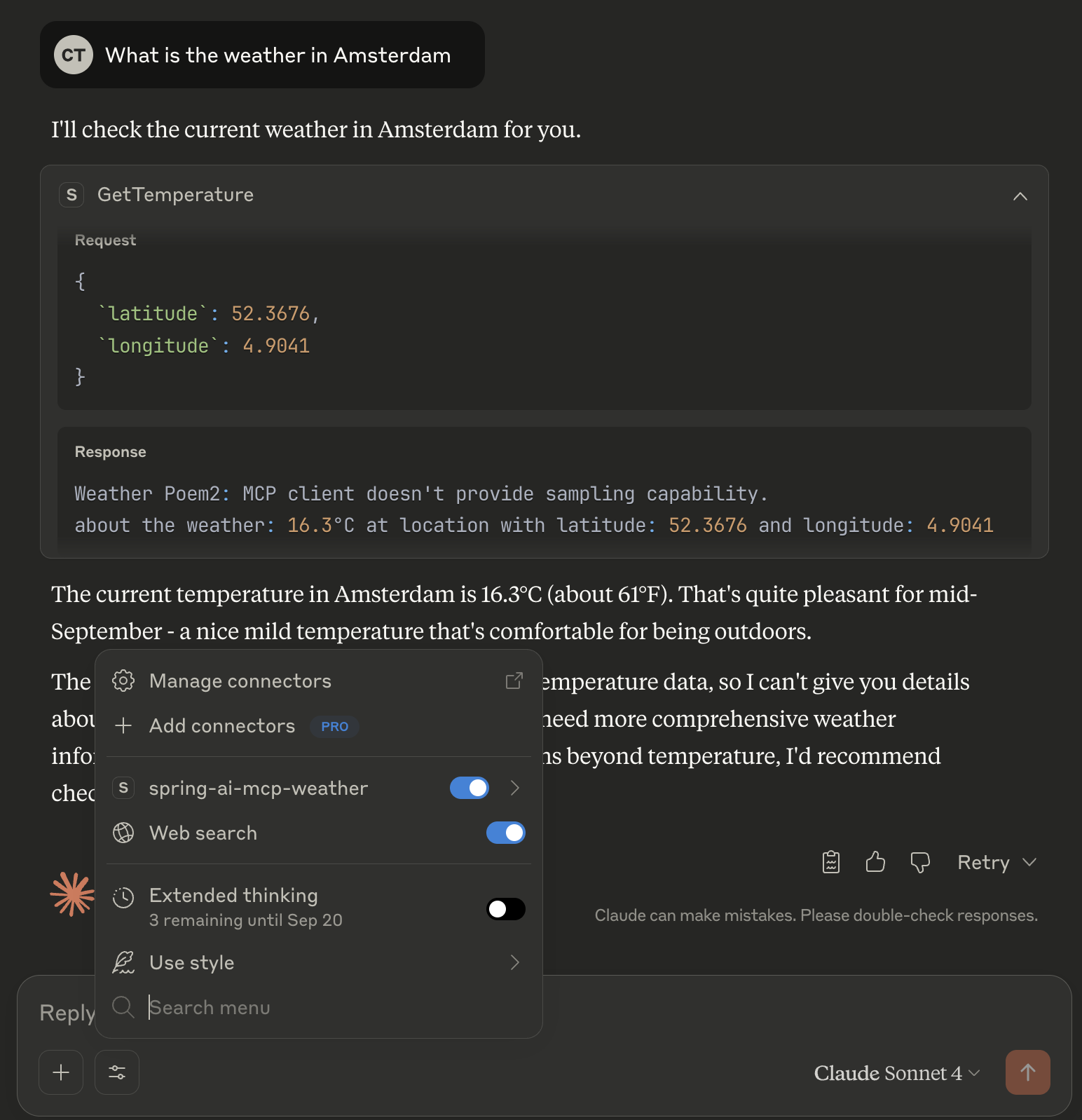
Follow the [MCP server installation for Claude Desktop](https://www.anthropic.com/engineering/desktop-extensions) for further guidance. The free version of the Claude Desktop doesn't support Sampling!
### Advanced Server Features
Let's extend our MCP Weather Server to demonstrate advanced MCP capabilities including Logging, Progress Tracking, and Sampling.
These features enable rich interactions between servers and clients:
* **Logging**: Send structured log messages to connected clients for debugging and monitoring
* **Progress Tracking**: Report real-time progress updates for long-running operations
* **Sampling**: Request the client's LLM to generate content based on server data
In this enhanced version, our weather server will log its operations to the client for transparency, report progress as it fetches and processes weather data
and request the client's LLM to generate an epic poem about the weather forecast
Here's the updated server implementation:
```java theme={null}
@Service
public class WeatherService {
public record WeatherResponse(Current current) {
public record Current(LocalDateTime time, int interval, double temperature_2m) {}
}
@McpTool(description = "Get the temperature (in celsius) for a specific location")
public String getTemperature(
McpSyncServerExchange exchange, // (1)
@McpToolParam(description = "The location latitude") double latitude,
@McpToolParam(description = "The location longitude") double longitude,
@McpProgressToken String progressToken) { // (2)
exchange.loggingNotification(LoggingMessageNotification.builder() // (3)
.level(LoggingLevel.DEBUG)
.data("Call getTemperature Tool with latitude: " + latitude + " and longitude: " + longitude)
.meta(Map.of()) // non null meta as a workaround for bug: ...
.build());
WeatherResponse weatherResponse = RestClient.create()
.get()
.uri("https://api.open-meteo.com/v1/forecast?latitude={latitude}&longitude={longitude}¤t=temperature_2m",
latitude, longitude)
.retrieve()
.body(WeatherResponse.class);
String epicPoem = "MCP Client doesn't provide sampling capability.";
if (exchange.getClientCapabilities().sampling() != null) {
// 50% progress
exchange.progressNotification(new ProgressNotification(progressToken, 0.5, 1.0, "Start sampling")); // (4)
String samplingMessage = """
For a weather forecast (temperature is in Celsius): %s.
At location with latitude: %s and longitude: %s.
Please write an epic poem about this forecast using a Shakespearean style.
""".formatted(weatherResponse.current().temperature_2m(), latitude, longitude);
CreateMessageResult samplingResponse = exchange.createMessage(CreateMessageRequest.builder()
.systemPrompt("You are a poet!")
.messages(List.of(new SamplingMessage(Role.USER, new TextContent(samplingMessage))))
.build()); // (5)
epicPoem = ((TextContent) samplingResponse.content()).text();
}
// 100% progress
exchange.progressNotification(new ProgressNotification(progressToken, 1.0, 1.0, "Task completed"));
return """
Weather Poem: %s
about the weather: %s°C at location: (%s, %s)
""".formatted(epicPoem, weatherResponse.current().temperature_2m(), latitude, longitude);
}
}
```
1. **McpSyncServerExchange** - the `exchange` parameter provides access to server-client communication capabilities. It allows the server to send notifications and make requests back to the client.
2. **@ProgressToken** - the `progressToken` parameter enables progress tracking. The client provides this token, and the server uses it to send progress updates.
3. **Logging Notifications** - sends structured log messages to the client for debugging and monitoring purposes.
4. **Progress Updates** - reports operation progress (50% in this case) to the client with a descriptive message.
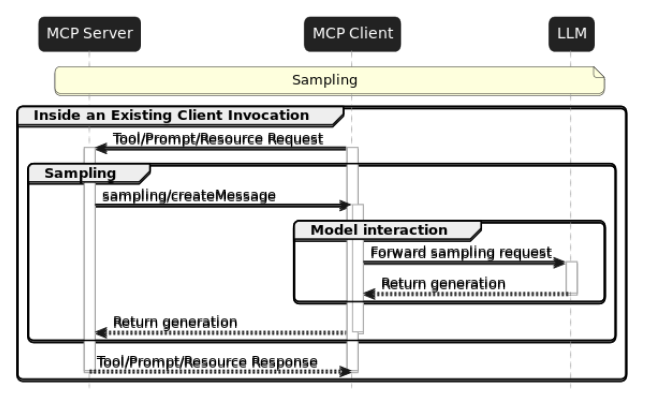
5. **Sampling Capability** - the most powerful feature - the server can request the client's LLM to generate content.
This allows the server to leverage the client's AI capabilities, creating a bidirectional AI interaction pattern.
The enhanced weather service now returns not just weather data, but a creative poem about the forecast, demonstrating the powerful synergy between MCP servers and AI models.
## Build an MCP Client
Let's build an AI application that uses an LLM and connects to MCP Servers via MCP Clients.
#### Client Configuration
Create a new Spring Boot project (`mcp-weather-client`) with the following dependencies:
```xml theme={null}
org.springframework.ai
spring-ai-starter-mcp-client
org.springframework.ai
spring-ai-starter-model-anthropic
```
```yml theme={null}
spring:
main:
web-application-type: none
ai:
# Set credentials for your Anthropic API account
anthropic:
api-key: ${ANTHROPIC_API_KEY}
# Connect to the MCP Weather Server using streamable-http client transport
mcp:
client:
streamable-http:
connections:
my-weather-server:
url: http://localhost:8080
```
Note that the configuration has assigned the `my-weather-server` name to the server connection.
#### Spring Boot Client Application
Create a client application that uses `ChatClient` connected to an LLM and to the MCP Weather Server:
```java theme={null}
@SpringBootApplication
public class McpClientApplication {
public static void main(String[] args) {
SpringApplication.run(McpClientApplication.class, args).close(); // (1)
}
@Bean
public ChatClient chatClient(ChatClient.Builder chatClientBuilder) { // (2)
return chatClientBuilder.build();
}
String userPrompt = """
Check the weather in Amsterdam right now and show the creative response!
Please incorporate all creative responses from all LLM providers.
""";
@Bean
public CommandLineRunner predefinedQuestions(ChatClient chatClient, ToolCallbackProvider mcpToolProvider) { // (3)
return args -> System.out.println(
chatClient.prompt(userPrompt) // (4)
.toolContext(Map.of("progressToken", "token-" + new Random().nextInt())) // (5)
.toolCallbacks(mcpToolProvider) // (6)
.call()
.content());
}
}
```
1. **Application Lifecycle Management** - the application starts, executes the weather query, displays the result, and then exits cleanly.
2. **ChatClient Configuration** - creates a configured [ChatClient](https://docs.spring.io/spring-ai/reference/1.1-SNAPSHOT/api/chatclient.html) bean using Spring AI's auto-configured builder. The builder is automatically populated with:
* The AI model configuration (Anthropic Claude in our case)
* Default settings and configurations from application.properties
3. **CommandLineRunner** - runs automatically after the application context is fully loaded. It injects the configured ChatClient for AI model interaction and the `ToolCallbackProvider` which contains all registered MCP tools from connected servers.
4. **AI Prompt** - instructs the AI model to get Amsterdam's current weather. The AI model automatically discovers and calls the appropriate MCP tools based on the prompt.
5. **Progress Token** - uses the `toolContext` to pass a unique `progressToken` to MCP tools annotated with @McpProgressToken parameter.
6. **MCP Tool Integration** - this crucial line connects the ChatClient to all available MCP tools:
* `mcpToolProvider` is auto-configured by Spring AI's MCP Client starter
* Contains all tools from connected MCP servers (configured via `spring.ai.mcp.client.*.connections.*`)
* The AI model can automatically discover and invoke these tools during conversation
#### Client MCP Handlers
Create a service class to handle MCP notifications and requests from the server.
These handlers are the **client-side counterparts** to the advanced server features we implemented above, enabling bidirectional communication between the MCP Server and Client:
```java theme={null}
@Service
public class McpClientHandlers {
private static final Logger logger = LoggerFactory.getLogger(McpClientHandlers.class);
private final ChatClient chatClient;
public McpClientHandlers(@Lazy ChatClient chatClient) { // Lazy is needed to avoid circular dependency
this.chatClient = chatClient;
}
@McpProgress(clients = "my-weather-server") // (1)
public void progressHandler(ProgressNotification progressNotification) {
logger.info("MCP PROGRESS: [{}] progress: {} total: {} message: {}",
progressNotification.progressToken(), progressNotification.progress(),
progressNotification.total(), progressNotification.message());
}
@McpLogging(clients = "my-weather-server")
public void loggingHandler(LoggingMessageNotification loggingMessage) {
logger.info("MCP LOGGING: [{}] {}", loggingMessage.level(), loggingMessage.data());
}
@McpSampling(clients = "my-weather-server")
public CreateMessageResult samplingHandler(CreateMessageRequest llmRequest) {
logger.info("MCP SAMPLING: {}", llmRequest);
String llmResponse = chatClient
.prompt()
.system(llmRequest.systemPrompt())
.user(((TextContent) llmRequest.messages().get(0).content()).text())
.call()
.content();
return CreateMessageResult.builder().content(new TextContent(llmResponse)).build();
}
}
```
##### Understanding the Handler Components:
1. **Progress Handler** - Receives real-time progress updates from the server's long-running operations. Triggered when the server calls `exchange.progressNotification(...)`. For example the weather server sends 50% progress when starting sampling, then 100% when complete. Commonly used to display progress bars, update UI status, or log operation progress.
2. **Logging Handler** - Receives structured log messages from the server for debugging and monitoring. Triggered when the server calls `exchange.loggingNotification(...)`. For example the weather server logs "Call getTemperature Tool with latitude: X and longitude: Y". Used to debug server operations, audit trails, or monitoring dashboards.
3. **Sampling Handler** - The Most Powerful Feature. It enables the server to request AI-generated content from the client's LLM. Used for bidirectional AI interactions, creative content generation, dynamic responses. Triggered when the server calls `exchange.createMessage(...)` with sampling capability check. The execution flow looks like this:
* If client supports sampling, requests a poem about the weather
* Client handler receives the request and uses its ChatClient to interact with the LLM and generate the poem
* Generated poem is returned to the server and incorporated into the final tool response
##### Key Design Patterns:
* **Annotation-Based Routing**: The `clients = "my-weather-server"` attribute ensures handlers only process notifications from the specific MCP server connection defined in your configuration: `spring.ai.mcp.client.streamable-http.connections.[my-weather-server].url`.
If your application connects to multiple MCP servers, use the `clients` attribute to assign each handler to the corresponding MCP Client:
```java theme={null}
@McpProgress(clients = {"weather-server", "database-server"}) // Handle progress from multiple servers
public void multiServerProgressHandler(ProgressNotification notification) {
// Handle progress from both servers
}
@McpSampling(clients = "specialized-ai-server") // Handle sampling from specific server
public CreateMessageResult specializedSamplingHandler(CreateMessageRequest request) {
// Handle sampling requests from specialized AI server
}
```
* The **@Lazy** annotation on ChatClient prevents circular dependency issues that can occur when the ChatClient also depends on MCP components
* **Bidirectional AI Communication**: The sampling handler creates a powerful pattern where:
* The server (domain expert) can leverage the client's AI capabilities
* The client's LLM generates creative content based on server-provided context
* This enables sophisticated AI-to-AI interactions beyond simple tool invocation
This architecture makes the MCP Client a **reactive participant** in server operations, enabling sophisticated interactions rather than just passive tool consumption.
#### Multiple MCP Servers
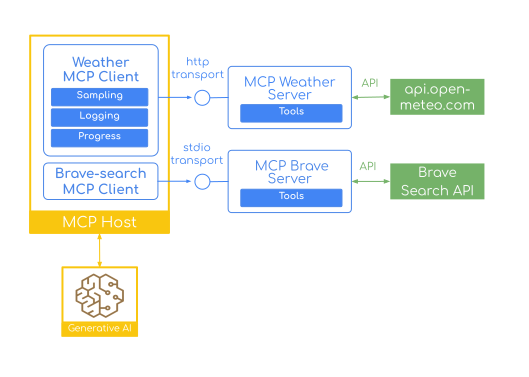
Connect to multiple MCP servers using different transports.
Here's how to add the [Brave Search MCP Server](https://github.com/brave/brave-search-mcp-server) for web search alongside your weather server:
```yaml theme={null}
spring:
ai:
anthropic:
api-key: ${ANTHROPIC_API_KEY}
mcp:
client:
streamable-http:
connections:
my-weather-server:
url: http://localhost:8080
stdio:
connections:
brave-search:
command: npx
args: ["-y",
"@modelcontextprotocol/server-brave-search"]
```
It uses the STDIO client transport.
Now your LLM can combine weather data and web search in a single prompt:
```java theme={null}
String userPrompt = """
Check the weather in Amsterdam and show the creative response!
Please incorporate all creative responses.
Then search online to find publishers for poetry and list top 3.
""";
```
#### Build & Run
Make sure that your MCP Weather Server is up and running.
Then build and start your client:
```bash theme={null}
./mvnw clean install -DskipTests
java -jar target/mcp-weather-client-0.0.1-SNAPSHOT.jar
```
## Conclusion
The combination of Spring's proven development model with MCP's standardized protocol creates a powerful foundation for the next generation of AI applications.
Whether you're building chatbots, data analysis tools, or development assistants, Spring AI's MCP support provides the building blocks you need.
This introduction covered the essential MCP concepts and demonstrated how to build both MCP Servers and Clients using Spring AI's Boot Starters with basic Tool functionality. However, the MCP ecosystem offers much more sophisticated capabilities that we'll explore in upcoming blog posts:
* **Java MCP Annotations Deep Dive**: Learn how to leverage Spring AI's annotation-based approach for creating more maintainable and declarative MCP implementations, including advanced annotation patterns and best practices.
* **Beyond Tools - Prompts, Resources & Completions**: Discover how to implement the full spectrum of MCP capabilities including shared prompt templates, dynamic resource provisioning, and intelligent autocompletion features that make your MCP servers more user-friendly and powerful.
* **Authorization support - securing MCP Servers**: Secure your MCP Servers with OAuth 2, and ensure only authorized users can access tools, resources and other capabilities. Add authorization support to your MCP Clients, so they can obtain OAuth 2 tokens to authenticate with secure MCP servers.
Ready to get started? Check out the [example applications](https://github.com/spring-projects/spring-ai-examples/tree/main/model-context-protocol) and explore the full potential of AI integration with Spring AI and MCP.
## Additional Resources
* [Model Context Protocol Specification](https://modelcontextprotocol.io/specification/) - Official MCP protocol documentation
* [MCP Java SDK](https://modelcontextprotocol.io/sdk/java/mcp-overview) - MCP Java SDK documentation
* [MCP Weather Example Code](https://github.com/tzolov/spring-ai-mcp-blogpost)
* [Spring AI MCP Overview](https://docs.spring.io/spring-ai/reference/1.1-SNAPSHOT/api/mcp/mcp-overview.html) - Complete architectural overview and concepts
* [MCP Client Boot Starter](https://docs.spring.io/spring-ai/reference/1.1-SNAPSHOT/api/mcp/mcp-client-boot-starter-docs.html) - Client configuration and usage guide
* [MCP Server Boot Starter](https://docs.spring.io/spring-ai/reference/1.1-SNAPSHOT/api/mcp/mcp-server-boot-starter-docs.html) - Server setup and configuration
* [STDIO and SSE Servers](https://docs.spring.io/spring-ai/reference/1.1-SNAPSHOT/api/mcp/mcp-stdio-sse-server-boot-starter-docs.html) - Traditional transport mechanisms
* [Streamable-HTTP Servers](https://docs.spring.io/spring-ai/reference/1.1-SNAPSHOT/api/mcp/mcp-streamable-http-server-boot-starter-docs.html) - Modern HTTP-based transport
* [Stateless Streamable-HTTP Servers](https://docs.spring.io/spring-ai/reference/1.1-SNAPSHOT/api/mcp/mcp-stateless-server-boot-starter-docs.html) - Cloud-native deployment options
* [Spring AI MCP Java Annotations](https://docs.spring.io/spring-ai/reference/1.1-SNAPSHOT/api/mcp/mcp-annotations-overview.html) - Annotation-based method handling for MCP servers and clients in Java
* [Client Annotations](https://docs.spring.io/spring-ai/reference/1.1-SNAPSHOT/api/mcp/mcp-annotations-client.html) - Declarative way to implement MCP client handlers using Java annotations
* [Server Annotations](https://docs.spring.io/spring-ai/reference/1.1-SNAPSHOT/api/mcp/mcp-annotations-server.html) - Declarative way to implement MCP server functionality using Java annotations
* [Special Parameters](https://docs.spring.io/spring-ai/reference/1.1-SNAPSHOT/api/mcp/mcp-annotations-special-params.html) - Special parameter types that provide additional context and functionality to annotated methods
***
*For the latest updates and comprehensive documentation, visit the [Spring AI Reference Documentation](https://docs.spring.io/spring-ai/reference/).*